


Most jewelry stores don't fail at technology because they picked the wrong software. They fail because the rollout was a mess. The tool gets bought, someone flips it on during Q4, the bench falls behind, three salespeople quietly keep using the old spreadsheet, and by month two nobody trusts the new system. Now you've got two sources of truth, a demoralized team, and a subscription you're paying for that only half the store actually uses.
That pattern is what this article is about. Not which POS or CRM to buy — but how you turn it on without breaking the store. Think of it as an operating system for adoption itself: a repeatable sequence that takes you from a small sandbox, into a limited pilot, through a dual-run period where old and new systems overlap, and finally into a clean cutover. Wrapped around that sequence are the boring-but-critical pieces most stores skip — role-based training, governance gates, a RACI so people know who decides what, and KPI templates so you can actually tell if the thing worked.
If you've already done the hard work of choosing a system — and if you haven't, the RFP checklist for high-value inventory is the place to start — this is the layer that comes next.
Why rollouts break in jewelry specifically
Jewelry is unusually hostile to sloppy technology changes, and it's worth naming why before getting into the mechanics.
You're carrying high-value, serialized inventory. A double-sell isn't an inconvenience — it's a five-figure problem and an angry customer. Your bench is a constrained resource with real work-in-progress at any moment: rings mid-resize, stones out for setting, repairs with promised pickup dates. And a big chunk of revenue flows through appointments and custom work, where the handoff between the sales floor and the bench has to be tight.
When a new system gets dropped into that environment without a plan, the failure points aren't abstract. A typical example: a store switches POS mid-November, the repair intake screen behaves differently than the old one, and for two weeks take-in tickets are missing metal type and promised dates. The bench can't prioritize. Customers call asking about status. Nobody can find the record because half the tickets are in the old system and half in the new one. That's not a software bug. That's a rollout that skipped the dual-run.
What tends to happen across these transitions is that the technical migration is rarely the thing that hurts. It's the human migration — training gaps, unclear ownership, and no defined moment when the old way officially stops.
The four phases, and what each one is actually for
The core of the adoption OS is a staged progression. Each phase has a job, and each phase has an exit gate you don't cross until specific criteria are met. Skipping a phase feels faster and almost always costs more later.
Never miss a sale or shipment again.
Jewlyly helps you manage orders, track inventory, and engage customers seamlessly.
- Real-time inventory tracking
- Automated customer notifications
- Sales and order analytics
No credit card required
| Phase | Duration (typical) | Who's involved | What "done" looks like |
|---|---|---|---|
| Sandbox | 1–2 weeks | Owner + 1 power user | Config decisions made, data model validated, no live customers |
| Pilot | 2–4 weeks | One team or one location | Real transactions on a limited scope, acceptance criteria met |
| Dual-run | 2–6 weeks | Whole store | Old + new running in parallel, records reconcile |
| Cutover | 1 day–1 week | Everyone | Old system read-only, new system is the single source of truth |
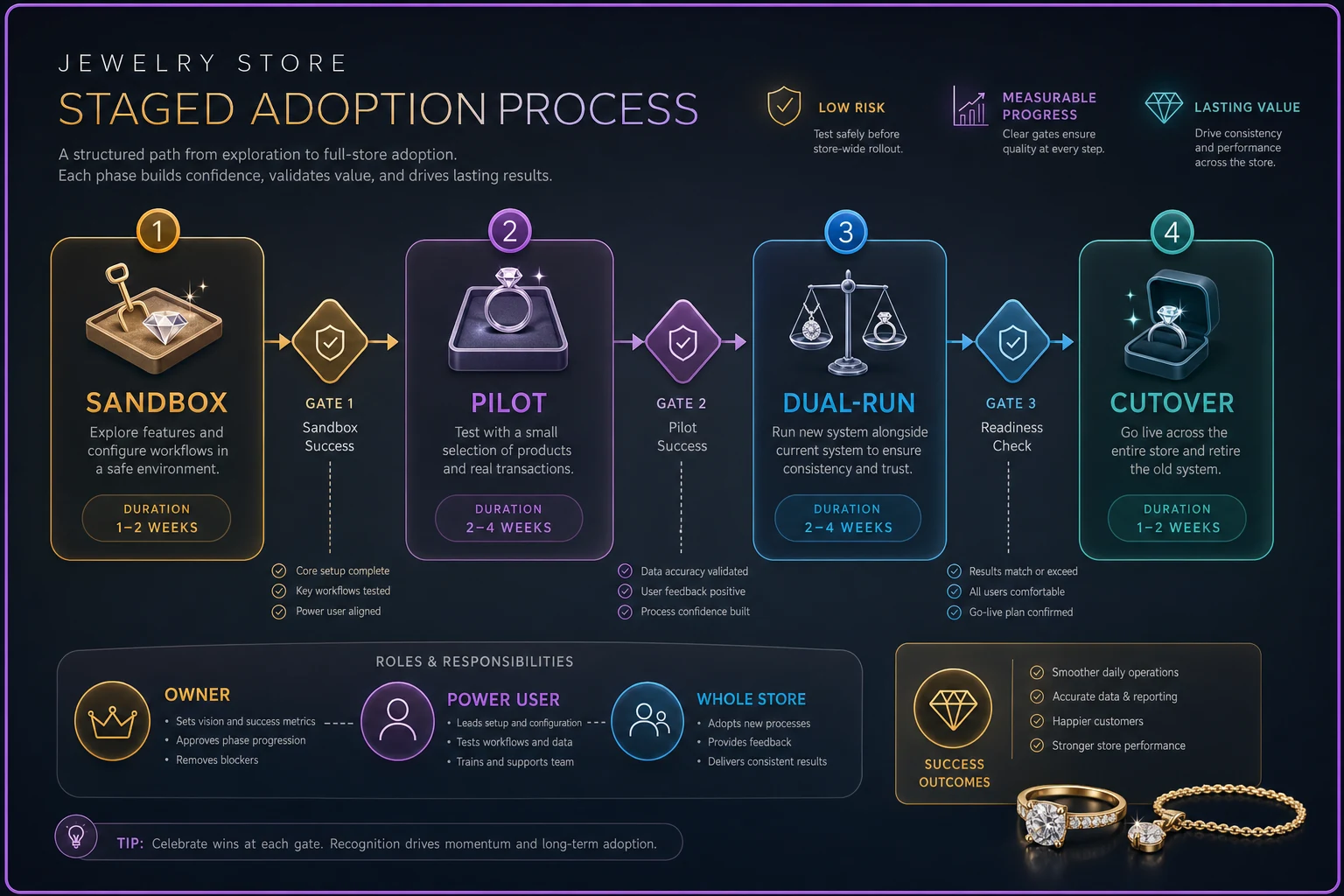
A simple diagram like this helps teams see the staged workflow at a glance.
Sandbox is where you make decisions without consequences. You're loading sample data, setting up categories, testing whether your SKU logic actually maps into the new fields, deciding how repair statuses will be named. Nobody's real appointment or real repair ticket is at risk. The mistake stores make is treating the sandbox as an IT task instead of an operational one. The owner and a senior salesperson need to be in it, because they're the ones who know that "waiting on stone" and "at setter" are different statuses that actually matter.
Pilot is your first contact with reality, deliberately kept small. Maybe it's just the repair intake workflow. Maybe it's one location or a single sales associate running their appointments through the new CRM for three weeks. The point is a contained blast radius. If something's wrong, it affects a slice of the business, not all of it.
Dual-run is the phase everyone wants to skip and shouldn't. For a defined window, both systems are live. Yes, it's double entry. Yes, it's annoying. But it's your safety net — if the new system loses a record or a report doesn't reconcile, you catch it against the old one while both are still running, not three weeks after you've deleted the old data.
Cutover is when the old system goes read-only. By the time you get here, it should feel almost boring, because everything's already been validated. If cutover still feels scary, you cut over too early.
Governance gates: who says "go"
Between each phase sits a gate. A gate is a short, deliberate decision — not a vibe. Somebody with authority looks at whether the exit criteria are met and says go or no-go.
Below is a lightweight RACI for a single-location store. In multi-location operations the roles spread out, but the logic holds. (If you're scaling across locations, this pairs closely with the broader thinking in the people-systems blueprint around ownership and accountability.)
-
Responsible — the person doing the config and running the phase (often a designated internal "rollout lead," frequently the ops manager)
-
Accountable — the owner or GM who signs off at each gate; one person, not a committee
-
Consulted — bench lead, senior sales, bookkeeper, whoever the phase touches
-
Informed — the rest of the staff, so nobody's blindsided
The most common governance failure is that nobody is Accountable. Everyone's kind of responsible, so when a gate decision needs to be made, it drifts. Weeks pass. The pilot never officially ends, dual-run never officially starts, and the whole thing becomes a permanent half-migration where the store runs on two systems indefinitely. Name one accountable person per rollout. That's it.
Pilot acceptance criteria: how you know the pilot passed
A pilot without written acceptance criteria isn't a pilot — it's just "trying the software for a while." You need concrete conditions that, if met, mean you advance to dual-run. Write them before the pilot starts so you're not moving the goalposts to justify a decision you already made.
-
Completeness — 95%+ of take-in tickets captured with metal type, item description, promised date, and customer contact, with no blank required fields.
-
Speed — average intake time no worse than the old process after the first week. A little slower during learning is fine; permanently slower is a config problem.
-
Handoff integrity — every ticket that goes to the bench shows the correct status and appears on the bench queue within a set time.
-
Reconciliation — pilot records match against the old system with zero orphaned or duplicate tickets.
-
User confidence — the people running it can complete core tasks without asking for help by the end of week two.
Not all of these are numeric, and that's fine. "User confidence" is a judgment call. The point is you agreed in advance what you're looking for.
Role-based training: stop training everyone on everything
The training mistake almost everyone makes is a single all-hands session where the whole team watches the same two-hour demo. Sales sits through inventory receiving they'll never touch. The bench sits through CRM follow-up sequences they don't care about. Everyone leaves having retained maybe 20% of what applied to them.
Training should be split by role and tied to the actual workflows each person owns.
Sales curriculum — appointment capture, pulling up customer history, creating a quote, placing a hold, initiating a custom order, and reading item availability so they don't promise something that's out for repair. Short modules, done on the real system during the pilot, not in a classroom.
Bench curriculum — receiving work into the queue, updating repair and custom-order statuses, logging time against jobs, flagging when a job is blocked (waiting on a stone, waiting on customer approval), and closing out completed work so it flows back to pickup notification.
Operations / front-desk curriculum — receiving inventory, tagging and serializing, running end-of-day, pulling the reports that matter for reconciliation, and managing customer-facing status communication.
Each module should be small — a 15-minute focused walkthrough of one workflow, with a two- or three-step "prove you can do it" check at the end. A sample bench module: receive an incoming repair, set the correct status, log 30 minutes of work against it, then mark it blocked with a reason. If they can do that clean, they're ready.
Keep the modules as living documents. When the config changes, the module changes. Training that's frozen the day of launch goes stale within a month.
The single-source-of-truth problem that dual-run exists to solve
Everything above only works if the new system actually becomes the one place data lives. The reason dual-run gets a defined end date is that two live systems are only safe temporarily. Left running in parallel indefinitely, you recreate the exact problem you were trying to fix — conflicting records, unclear which one's right, staff picking whichever they prefer.
This is where the underlying data discipline matters more than the software itself. If your product data, customer records, and repair history aren't structured cleanly going in, the migration just moves the mess into a nicer interface. It's worth getting the foundation right before cutover, and the single source of truth data architecture breakdown covers how those records should be organized so the new system inherits clean data instead of inheriting chaos.
-
Every day, someone (the rollout lead) exports the day's activity from both systems.
-
Records are matched — every transaction, repair, and appointment in the old system should have a twin in the new one.
-
Discrepancies get logged and resolved before the next day.
-
When you hit a defined streak of clean reconciliation days — say, ten consecutive with zero unresolved discrepancies — that's your green light for cutover.
That reconciliation streak is the most honest cutover signal there is. It's not a calendar date; it's evidence the new system is holding the truth reliably.
Cutover checklist
By cutover, the work is mostly confirmation. Still, run the list — the discipline is what prevents the "oh no, we forgot the layaway balances" moment three days later.
-
[ ] Final data migration complete and reconciled
-
[ ] Open repairs and custom orders all present in new system with correct statuses
-
[ ] Open layaway/financing balances verified against old system
-
[ ] Appointment calendar fully transferred, no gaps or duplicates
-
[ ] All staff completed their role-based training and passed checks
-
[ ] Reports the bookkeeper needs for month-end verified in new system
-
[ ] Old system set to read-only (not deleted — keep it accessible for a defined retention window)
-
[ ] Support/escalation contact posted where staff can see it
-
[ ] Owner/GM sign-off on the cutover gate
Keep the old system accessible for at least a full reconciliation cycle after cutover.
The "read-only, not deleted" line matters. Keep the old system accessible for at least a full reconciliation cycle after cutover. Deleting it the day you go live is how stores lose historical repair records they didn't know they'd need.
Measuring whether it worked: ROI and KPI templates
Most stores never actually check whether the rollout paid off. They feel busier or less busy and move on. A simple before/after KPI snapshot fixes that.
-
Average repair intake time
-
Percentage of tickets with complete required fields
-
Repair turnaround time (intake to pickup-ready)
-
No-show / missed appointment rate
-
Double-sell or availability-conflict incidents
-
End-of-day reconciliation time
-
Staff-reported friction (a quick qualitative check, honestly)
On the ROI side, the math doesn't need to be complicated. Add up the fully-loaded cost — subscription, migration time, training hours, and the productivity dip during dual-run — and set it against what you save or gain. If a cleaner intake and handoff process trims reconciliation from something like two hours a day down to twenty minutes, that's roughly 25–30 hours a month back for whoever was doing it. Add fewer availability conflicts and a lower missed-appointment rate, and the payback window on a well-run adoption is usually a few months, not years. A rollout that never reaches ROI is almost always one where dual-run got skipped and the store limped along on two systems.
A short real scenario
A single-location store doing a fair amount of repair and custom work decided to move off a patchwork of an old POS and a couple of spreadsheets for bench tracking. Their first instinct was to switch everything over a single weekend.
Instead they ran the staged version. Two weeks in a sandbox getting repair statuses and SKU fields right. A three-week pilot on repair intake only — one senior salesperson and the bench lead. Acceptance criteria written up front. Then a five-week dual-run across the whole store.
The messy part showed up exactly where you'd expect: during dual-run, reconciliation caught around a dozen repair tickets a week that weren't matching between systems, mostly because the promised-date field was being filled inconsistently. Because both systems were still live, they caught and corrected the habit before cutover instead of after. By the time they went read-only on the old system, reconciliation had been clean for roughly two weeks straight.
The outcome wasn't dramatic, and that's kind of the point. Intake got a little faster, status-related customer calls dropped noticeably, and month-end stopped being a two-hour scavenger hunt. No lost repairs during the transition, no double-sells, no Q4 meltdown. The rollout was boring. Boring is the goal.
When this level of process makes sense — and when it doesn't
This staged approach is worth the overhead when you're changing something core: POS, your main inventory or CRM system, or the workflow the bench and sales floor depend on daily. The higher your inventory value and the more your revenue leans on repairs, custom, and appointments, the more this discipline pays for itself.
It's overkill for small, low-risk tools. If you're adding a standalone appointment reminder app that doesn't touch inventory or the bench, you don't need a multi-phase governance process — just turn it on and check it in a week. Forcing heavy process onto trivial changes trains your team to ignore process entirely, which hurts you when a big migration actually needs it.
One other thing: don't cut over in the middle of peak season. Nobody should be switching their POS three weeks before the holidays. If a system is genuinely broken and you have to move mid-season, shrink the scope hard — pilot one workflow, keep dual-run long, and wait for the pressure to ease before going fully live.
The takeaway
Buying good jewelry retail technology is the easy part. The stores that actually get value from their tools are the ones that treat the rollout as its own operational project — staged phases, a named person accountable at each gate, training built around what each role actually does, and a dual-run period long enough to prove the new system holds the truth before the old one goes dark. Do that, and the technology mostly disappears into the background where it belongs. Skip it, and you'll spend the next year running two half-systems and wondering why the shiny new software never quite stuck.
Ready to elevate your jewelry store operations?
Join 500+ jewelers using Jewlyly to increase efficiency, reduce errors, and grow revenue.