

Most jewelry stores treat samples like an afterthought. They're the rings in the case that aren't really "inventory," the vendor pieces sitting in a drawer, the demo watches that migrate from counter to counter until nobody's sure which ones went back to the rep and which ones quietly disappeared. Then at year-end, your insurance review or your physical count turns up a $4,200 gap and nobody can explain it.
Samples are a weird category. They're high value, they move constantly, they're handled by customers, and they're often owned by someone else. That combination is exactly how shrink happens — not through dramatic theft, but through quiet drift. This article is about tightening that drift to zero, and then using the same tracking to answer a question most stores never actually measure: do your displays convert?
Why samples slip through the cracks in the first place
The core issue is that samples don't live cleanly in any system. Your POS wants to treat everything as sellable inventory. Your consignment tracking (if you have it) is built for pieces you intend to sell on behalf of a vendor, not loaners meant to come back. So samples end up in a no-man's-land — a spreadsheet, a sticky note, or someone's memory.
A typical example looks like this: a bridal vendor drops off six mounting samples for a trunk show. Three sell and get reordered as real stock. Two go back. One gets "set aside for a customer who's deciding" and then the sales associate handling it goes on vacation. Six weeks later the vendor's rep asks for it back and nobody knows where it is. It wasn't stolen. It was just never assigned a state that anyone was accountable for.
This usually happens when the same physical item passes through three different purposes — received loaner, active demo, pending return — without the status ever being formally recorded. The piece is identical; only its state changed. And if your system can't represent state, your staff can't track it.
The sample lifecycle, broken into states
Every sample should move through a defined set of states, and every transition should have a person, a timestamp, and ideally a photo attached. Think of it less as inventory and more as a chain of custody.
Never miss a sale or shipment again.
Jewlyly helps you manage orders, track inventory, and engage customers seamlessly.
- Real-time inventory tracking
- Automated customer notifications
- Sales and order analytics
No credit card required
-
Received — Sample arrives from vendor. Log who sent it, the expected return date, the agreed valuation, and whether it's consignment-convertible (can you sell it and reorder, or must it go back?).
-
Checked in / tagged — Assign an internal SKU and a state flag. Photograph it on arrival. This is your baseline condition record.
-
On display / active demo — The piece is in a case or being shown. This is where it spends most of its life, and where accountability matters most.
-
Customer handling — Optional but useful for high-value items. Logged when a specific associate pulls it for a customer appointment.
-
Pending return — Flagged once you've decided to send it back. Starts a countdown against the vendor's return window.
-
Returned / closed — Confirmed shipped or picked up, with tracking or a signed rep acknowledgment.
-
Converted to stock — Alternative endpoint
you bought it, it's now real inventory, and it leaves the sample system entirely.
Visualize the lifecycle and its required logs with a simple diagram to make onboarding and audits frictionless.
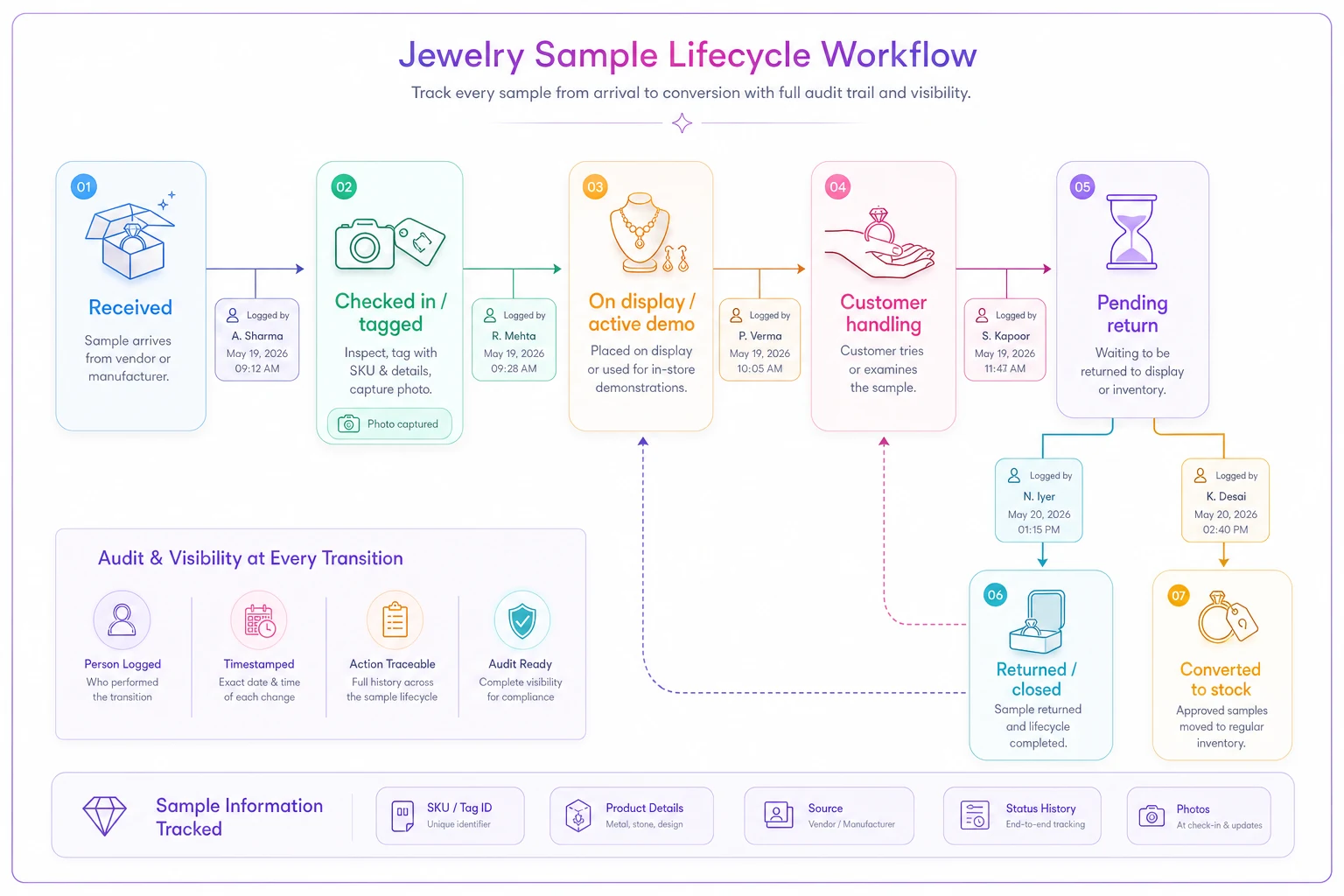
The states that cause the most loss are the transitions between steps 3, 4, and 5. A piece sitting "on display" is low risk. A piece that's been pulled for a customer, not sold, and not put back is where things vanish. Your flag system needs to make that limbo state visible, not invisible.
SKU and state flags: keep them separate
One mistake worth calling out directly: don't bury sample status inside the SKU itself. People try to do this — adding a suffix like -SMP or -DEMO to the item number — and it creates chaos the moment the sample converts to real stock or the item's purpose changes.
Keep the SKU as the stable identifier of the physical object, and use a separate state flag for where it is in the lifecycle. A sample mounting is the same object whether it's "on display" or "pending return." Its identity shouldn't change just because its status did. This is the same logic behind a clean product-data model generally — attributes that describe the thing stay separate from attributes that describe its current situation.
A practical flag schema looks like this:
| Flag field | Example values | Who updates it |
|---|---|---|
sample_state | received, ondisplay, demoout, pending_return, returned, converted | Any staff, logged |
ownership | vendor_loan, consignment, owned | Set at intake only |
return_due | date or "none" | Set at intake, drives alerts |
valuation_tag | insured_value tier | Set at intake |
condition_ref | link to intake photo | Set at check-in |
Each field answers a different question. State tells you where it is. Ownership tells you who's liable. Return_due tells you what's urgent. Jamming all of that into one field is how stores end up with samples they can't account for.
Insurance valuation tags — the part everyone underestimates
Samples create a nasty insurance gray area. If a vendor loaner worth $8k is damaged in your showroom, or stolen in a smash-and-grab, who eats that? Your policy may or may not cover items you don't own. The vendor's policy may or may not cover items in your custody. If you don't have the valuation documented at intake, you're negotiating the number after the loss — which never goes well.
So every sample gets a valuation tag at the moment it enters the "received" state. Not a guess. The agreed value, in writing, ideally echoed back to the vendor in an email so there's a paper trail. Bucket them into tiers so your floor controls and your coverage match the risk:
-
Tier 1 (under ~$1,500) standard case handling, logged but not individually tracked beyond state.
-
Tier 2 (~$1,500–$7,500) individual photo at intake, customer-handling log required, counted in weekly reconciliation.
-
Tier 3 (over ~$7,500) dual sign-off on intake and return, never leaves the case without a logged
demo_outentry, included in your scheduled policy or a dedicated loaner rider.
Stores that handle this well treat the vendor loaner's valuation tag as seriously as their own high-value SKUs. The ones that get burned treat loaners as "not really ours, so not really our problem" — right up until a claim.
Make sure your intake valuation lines up with the documentation standards you already use for owned pieces. If you've built solid certificate and appraisal workflows for your own inventory photography and records, reuse that same discipline for samples. The intake photo isn't just for insurance — it's your condition baseline for the return dispute that's eventually coming.
Rotation schedules: stop letting dead samples occupy prime real estate
There's a cost most owners don't track: display slots are finite, and a sample that's been in the same spot for four months isn't a sample anymore — it's clutter. Vendors send you demo pieces so customers can see and touch them. If a piece has been handled zero times in six weeks, it's earning its spot on sentiment, not performance.
A rotation schedule forces the question. Set a review cadence — monthly works for most stores — where you pull a simple report of every sample by samplestate and days-in-state. Anything that's been "ondisplay" past a threshold with no customer-handling activity gets a decision:
-
Rotate it to a different case or sightline.
-
Return it and request a different style.
-
Convert it to stock if it's actually moving conversations even without selling.
-
Flag it for the vendor as "not performing, send alternatives."
Include rotation outcomes in your monthly floor planning meeting so display decisions become habitual.
The rotation review pairs naturally with how you plan your overall floor. If you're already thinking about how local assortment and displays line up — which is worth doing systematically, see the approach in aligning local assortment, online catalog and displays — then samples should be part of that same conversation, not a separate pile of stuff the reps left behind.
Stores that rotate on a schedule tend to have fresher-looking cases even with the same inventory, simply because stale pieces get moved before customers start mentally filing them as "the stuff that's always there."
Now the interesting part — measuring whether displays actually convert
This is where the sample system earns its keep beyond loss prevention. Once every sample has a stable SKU and a state history, you can run real A/B tests on your displays. Most jewelry stores never do this. They move things around based on gut feel and never isolate the variable.
An A/B display test is simple in concept: take two comparable samples (or the same style in two placements), change exactly one thing, and measure the difference in how often it triggers a customer interaction or a sale of that style.
-
Case position — eye-level center vs. lower corner.
-
Lighting — warm vs. neutral on the same piece.
-
Context — ring shown alone vs. shown in a styled grouping.
-
Signage — priced vs. "ask us" vs. with a short story card.
-
Proximity — bridal next to the appointment table vs. near the entrance.
The measurement is where the state log matters. Because you're logging demo_out events — every time an associate pulls a piece for a customer — you have a real engagement metric, not just a sales number. A piece can be pulled twenty times and sold three times. That tells you far more than a flat "it sold 3 units" ever would.
A simple A/B test template
| Field | Variant A | Variant B |
|---|---|---|
| Sample SKU(s) | ||
| Variable changed | ||
| Placement / setting | ||
| Test window (dates) | ||
| Demo pulls (from state log) | ||
| Style sales during window | ||
| Pull-to-sale rate | ||
| Decision |
Run each test for a consistent window — two to four weeks captures enough foot traffic for most stores without dragging on so long that season or promotions muddy the result. And test one variable at a time. The temptation is to move five things at once because the case "needed a refresh," but then you've learned nothing you can repeat.
A real scenario
A single-location store doing a healthy bridal business kept around 40–50 vendor sample mountings on the floor at any time. Their tracking was a shared spreadsheet that two of their five associates actually updated. At their annual insurance review, they found four samples unaccounted for — roughly $9k–$11k in agreed vendor value — and spent an uncomfortable month sorting out who owed what with two vendors.
They moved to a flagged-state system: every sample got an internal SKU, an intake photo, a valuation tier, and a required state update on pull and return. Nothing fancy — the discipline was the point. Within the first two quarters, unaccounted samples dropped to zero, and return disputes effectively stopped because the intake photo settled every "it arrived like that" argument on the spot.
The unexpected win was on the display side. Once they started logging demo pulls, they discovered one bridal case position was generating almost twice the pulls of an equivalent case six feet away. They moved their highest-margin mountings into that spot, and reorders for that style group noticeably picked up over the next couple of months. Same inventory, same vendors — they just finally knew which real estate actually worked.
When this level of rigor makes sense — and when it doesn't
If you carry only a handful of samples at a time and they rarely change, a full state-flag system is overkill. A clean logbook and a monthly glance will do. The ROI shows up when you're juggling dozens of loaners across multiple vendors, running trunk shows, or operating more than one location where samples move between stores.
It's a bad idea to layer this on if your core inventory tracking is still a mess — fix the foundation first, because a sample system built on top of unreliable SKU practices just adds a second broken layer. And if your staff won't update states consistently, the system is worse than useless, because a half-maintained log gives you false confidence. The honest move there is to shrink the scope: track only Tier 2 and Tier 3 samples rigorously and let the cheap stuff ride on case handling alone.
Whatever tooling you use — a dedicated operational platform, your POS with custom fields, or a disciplined spreadsheet — the system matters less than the rule that state changes get logged by the person who made them, at the moment they make them. Good operational software makes that friction low enough that people actually do it, with automatic return-date alerts and a running state history you don't have to maintain by hand. But the discipline comes first. The tool just protects it.
The thing most stores miss
Samples are usually framed as a loss-prevention problem, and they are. But the same tracking that stops $9k from walking out the door also hands you the only reliable data you'll ever get on whether your merchandising decisions are working. You're already handling these pieces every day. Once you capture where they are and how often they get pulled, you've turned your showroom into a quiet experiment that runs itself — and you stop guessing which cases, which lighting, and which placements are actually turning browsers into buyers.
Start with intake photos and a real state flag on your Tier 2 and 3 samples this month. The conversion insights will come on their own once the data's flowing.
Start with intake photos and a real state flag on your Tier 2 and 3 samples this month. The conversion insights will come on their own once the data's flowing.
Ready to elevate your jewelry store operations?
Join 500+ jewelers using Jewlyly to increase efficiency, reduce errors, and grow revenue.