



A customer files a claim on a lost tennis bracelet. Your insurer asks for proof of the item's condition and specifications at the time of sale. You pull up your files and find three things: a blurry phone photo named IMG_4471.jpg, a slightly-too-yellow shot that makes the diamonds look tinted, and nothing that clearly shows the clasp or the total carat weight engraving. The adjuster now has room to lowball, and you have no clean way to push back.
That's the part most jewelers miss about product photography. It's not just a conversion tool for the website. Your photos quietly become part of your claims record, your dispute defense, your POS listing, and your insurance appraisal file — often the same photo doing all four jobs. When the photography is sloppy or unlabeled, every one of those systems inherits the mess.
This post is a tight, practical jewelry product photography SOP built around three things that actually cause problems downstream: category-specific shot lists, filenames tied to your SKU schema, and export rules that keep the same image usable across POS, e-commerce, and insurance records. Not a "how to light a ring" tutorial — there's plenty of those. This is about the operational plumbing that makes photos reliable.
Why the mess happens (it's almost never the camera)
Bad jewelry photos rarely come from bad equipment. Most shops shoot fine images and then lose control of them in the workflow. The failure pattern is boringly consistent:
-
One person shoots, another person uploads, and nobody agreed on what a "good" shot even includes for that category.
-
Files come off the camera as
DSC_0093and get renamed by whoever is fastest, using whatever made sense that afternoon. -
The website team compresses images hard for page speed, so the only surviving copy of a $6,000 ring is a 90KB JPEG that's useless for a claim.
-
Nobody keeps a full-resolution master, so when a customer disputes a stone's clarity, there's no zoomable original.
In real operations, this usually surfaces when volume spikes — a bridal event, a new-vendor intake of 200 SKUs, or the pre-holiday push. Under pressure, the informal system collapses. People stop matching photos to SKUs correctly, and you end up with rings photographed against three different backgrounds and a folder where you can't tell the 1.0ct from the 1.5ct without opening each file.
The root cause is that photography gets treated as a creative task instead of a data-entry task. It's both. The creative part is fine. The data part is where money leaks.
Start with category-specific shot lists, not a universal one
The biggest early mistake is using one generic shot list for everything. A ring, a pair of studs, and a watch do not need the same angles, and a "just shoot 4 photos of each" rule guarantees you'll be missing the one angle that matters when someone asks for it later.
Never miss a sale or shipment again.
Jewlyly helps you manage orders, track inventory, and engage customers seamlessly.
- Real-time inventory tracking
- Automated customer notifications
- Sales and order analytics
No credit card required
| Category | Required shots | Why it matters downstream |
|---|---|---|
| Rings | Top-down, 45° profile, side profile, inside-band hallmark/engraving, on-hand or sizer scale shot | Hallmark shot proves metal/karat for claims; profile shows setting height buyers ask about |
| Earrings (studs/drops) | Front pair, single macro of stone/setting, back/post & clasp, scale reference | Back shot documents post type and any damage on returns |
| Necklaces/Chains | Full-length flat lay, clasp macro, pendant macro, link detail | Clasp and link shots settle "it broke on its own" disputes |
| Bracelets/Tennis | Laid straight, clasp macro, one section macro showing stone count, on-wrist scale | Section macro supports carat-weight and stone-count claims |
| Watches | Dial front, caseback (serial/reference), crown/side profile, bracelet/strap, clasp | Serial/reference caseback is the single most important insurance shot |
| Loose stones | Table-up, pavilion, girdle profile, on-scale/tweezers, cert next to stone | Ties the physical stone to its certificate visually |
Worth noting: the "boring" shots — hallmarks, casebacks, clasps, serials — are the ones that protect you in claims and returns, and they're the ones people skip because they don't sell. Build them into the required list so they can't be dropped. This ties directly into your certificate and appraisal workflows, because the photo showing a serial or engraving is often what links a physical piece to its paperwork.
Filenames must be tied to your SKU schema — this is the whole game
If you do one thing from this post, do this: the filename is the link between the photo and everything else. Get this wrong and no amount of good shooting saves you.
The problem with IMG_4471.jpg is that it means nothing to your POS, your website, or a future you searching for a specific piece. The fix is a filename convention that mirrors your SKU schema exactly, plus a suffix that identifies the shot.
``
[SKU][shot-type][sequence].jpg

RNG-14KWG-0087top01.jpg
RNG-14KWG-0087profile02.jpg
RNG-14KWG-0087hallmark03.jpg
WCH-OMEGA-0421caseback02.jpg
``
The SKU portion should be identical to what lives in your POS. Not close. Identical. The most common breakage is a filename using 0087 while the POS has 00087 or RNG87 — now nothing auto-matches and someone spends an afternoon reconciling by eye.
If you don't have a clean, purpose-built SKU structure yet, fix that first — the whole naming system depends on it. This is exactly why a purpose-built SKU schema matters beyond reorders: it becomes the backbone your photo files, POS listings, and insurance records all hang on.
A few rules that prevent the usual pain:
-
No spaces, no special characters. Hyphens or underscores only. Spaces break URLs and some upload tools.
-
Fixed shot-type vocabulary.
top,profile,side,hallmark,clasp,caseback,macro,scale— a short controlled list, not free text. If one person writestopdownand another writestop-down, sorting falls apart. -
Two-digit sequence numbers so files sort correctly (
01,02, not1,10,2). -
Hallmark/serial shots always get the same suffix so you can search across your entire library for every caseback or hallmark in seconds.
This is where a lot of shops quietly hurt themselves on the claims side. Your web developer or Shopify app compresses images hard for page speed. That's correct for the website. It's a problem if that compressed file is the only copy you kept.
Export and compression: stop letting one setting destroy your only master
You need three export tiers from one shoot. Each one serves a different system, and none of them should be collapsing into the others:
-
Master (archive). Full-resolution, minimal compression. TIFF or high-quality JPEG. This is your insurance and claims copy. Store it somewhere, don't publish it, don't touch it.
-
E-commerce. Resized to around 2000px on the long edge, moderate compression, sRGB color space, consistent dimensions so your product grid looks even.
-
POS/thumbnail. Small, fast-loading, cropped consistently for quick visual ID at the counter.
The mistake is generating only tiers 2 and 3, then deleting the originals to save drive space. Storage is cheap. A single disputed high-value claim costs more than years of cloud storage.
A couple of specifics that matter more than people expect:
-
Color space discipline. Shoot and archive in a wide color space if you like, but export web images as sRGB. The classic complaint — "the sapphire looked purple online and blue in person" — is usually a color-space mismatch, not bad lighting. Off-color stones don't just hurt sales; they fuel "not as described" returns.
-
Don't over-compress the master to hide flaws. Adjusters and serious buyers zoom. If compression smears the surface so inclusions vanish, that helps nobody and can look like you're concealing condition.
The mistake is generating only tiers 2 and 3, then deleting the originals to save drive space. Storage is cheap. A single disputed high-value claim costs more than years of cloud storage.
A batch-shoot workflow that actually feeds three systems
Shooting one item at a time and uploading it three places is how small teams burn hours and introduce errors. Batch the work, and let one clean pass populate everything. The steps below hold up well under a 150-piece vendor intake — which is roughly the point where informal systems start breaking down.
The underlying logic here is that errors happen at handoffs: camera to computer, computer to naming, naming to upload. Every handoff where the SKU could get mistyped is a place to build a check. Batching reduces the number of handoffs and makes those checks fast.
A visual guide to the batch-shoot workflow.
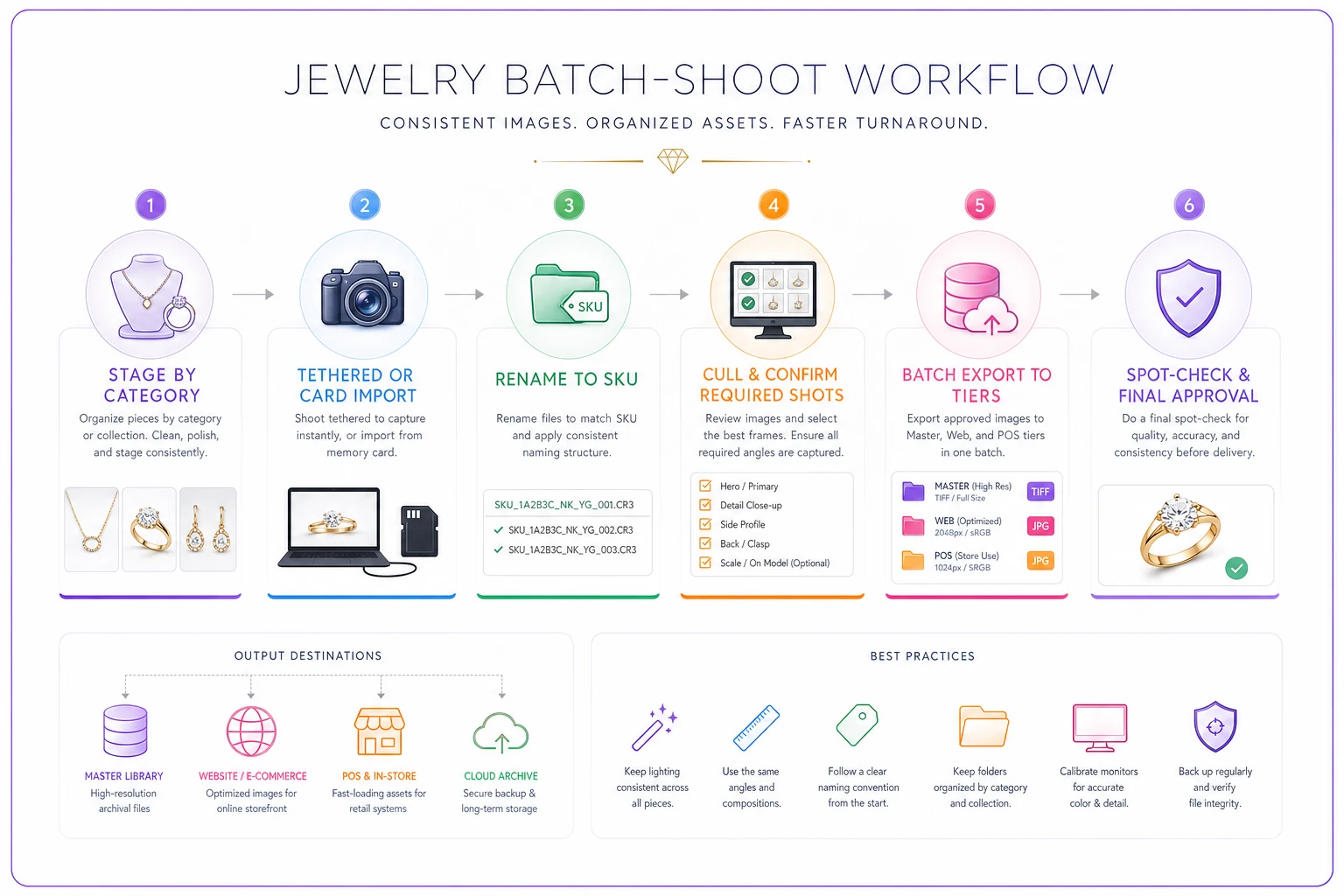
Batch-shoot process (150-piece intake or similar volume):
-
Stage by category first. Group all rings, then all earrings, etc. You keep the same lighting and camera settings per category, which makes exposure consistent — critical when 40 rings need to look like they belong in the same catalog.
-
Tether or card-import into folders named by shoot date and category.
2026-03-14_rings/. Don't let files pile up in one giant dump. -
Rename against the SKU list immediately, before moving on. This is the step people defer "until later," and later never comes. Do it while the pieces are still physically staged and you can verify SKU-to-item match.
-
Cull and confirm the required shots per the category list before the item leaves the table. Missing a caseback? Reshoot now, not next week when the watch is back in a display case.
-
Batch export all three tiers using saved presets. Masters to archive, web set to the e-commerce pipeline, POS set to point-of-sale.
-
Spot-check a sample. Open five random SKUs and confirm the filename, the SKU in POS, and the image all agree. Three minutes of checking catches systematic errors before they multiply across 150 items.
Rename against the SKU list immediately while the pieces are still staged to avoid mismatches.
The expensive errors happen at handoffs — camera to computer, computer to naming, naming to upload. Batching reduces those handoffs and makes the checks fast enough that nobody skips them.
Checklist: your per-item photography SOP
Print this and tape it near the shooting station.
-
- [ ] Item's SKU pulled up and confirmed against the physical piece
-
- [ ] Correct category shot list selected
-
- [ ] All required shots captured (including hallmark/serial/clasp)
-
- [ ] Scale reference shot included where relevant
-
- [ ] White balance / color checked against a reference
-
- [ ] Files renamed to
SKUshot-typesequencebefore moving on -
- [ ] Master exported and archived (untouched, full-res)
-
- [ ] E-commerce export generated (sRGB, standard dimensions)
-
- [ ] POS thumbnail generated
-
- [ ] Spot-check
filename, POS SKU, and image all match
A two-location shop doing roughly $2M annually had two recurring bleeds. First, their web team compressed everything and kept no masters, so when a customer disputed a chain's condition after a repair, they had nothing zoomable to prove original state — they ate a repair that ran a few hundred dollars rather than fight it. Second, their listing team spent close to a day and a half every month renaming and re-matching photos to SKUs because filenames were freeform.
A real scenario with numbers
They changed three things: a category shot list taped to the shooting table, a strict SKUshot-typeseq filename rule matching their POS exactly, and a three-tier export preset with archived masters.
The renaming and matching time dropped to a couple of hours a month once files came off the camera already labeled. Product pages stopped showing mismatched-background rings because setups were batched by category. And the next time an insurer pushed back on a claim, they sent the archived master with the hallmark shot and the adjuster settled without a prolonged back-and-forth. No dramatic revenue numbers — just a steady stop to the leaks and fewer arguments.
When to invest in this, and when not to bother
This makes sense when you carry meaningful inventory value, sell online, and deal with insurance or appraisal records — which covers most jewelers. The claims and dispute protection alone usually justifies the effort.
This is overkill when you're a tiny operation moving a handful of low-value pieces with no online store and no real claims exposure. A phone and a folder might genuinely be enough at that scale.
The people who should not half-do this: shops that adopt the filename rules but skip the archived masters. That's the worst of both worlds — you've spent effort on organization but still have nothing to defend a claim with. If you only have appetite for one part, keep the masters.
Where software quietly helps
None of this requires fancy tools — a disciplined team with presets and a checklist gets most of the value. Where a workflow or business-management platform earns its place is in removing the manual matching: when your photo filenames follow your SKU schema exactly, the system can auto-attach images to the right POS listing, the right online product, and the right item record without someone reconciling by hand. AI-assisted tagging can also flag when a required shot is missing from a SKU's set, or catch a filename that doesn't match any SKU before it becomes a mystery file sitting in a folder nobody touches. That's the point of tying naming to schema — it turns a tedious matching job into something that mostly takes care of itself.
The real win isn't the automation, though. It's that your photos stop being a creative afterthought and start behaving like reliable business records — ones that sell the piece today and defend it if a claim shows up next year.
The real win isn't the automation, though. It's that your photos stop being a creative afterthought and start behaving like reliable business records — ones that sell the piece today and defend it if a claim shows up next year.
Ready to elevate your jewelry store operations?
Join 500+ jewelers using Jewlyly to increase efficiency, reduce errors, and grow revenue.