



Most jewelry stores are running SKU systems that made sense at some point but now actively work against them. Random alphanumeric codes assigned by vendors, the "just add numbers sequentially" approach, half-implemented category codes — all of it creates friction at exactly the wrong moments. When a customer wants to reorder their engagement ring's matching band. When staff need to pull all 14k rose gold pieces for a display change. When you're trying to figure out which stone-metal combinations actually move.
The operational cost compounds daily. Staff develop workarounds, memorizing specific codes or keeping their own cheat sheets. Your POS can't group related items. Analytics turn into manual spreadsheet exercises. And every new vendor adds their own SKU format to the pile, making it progressively harder to untangle.
The Hidden Operational Drag of Inconsistent SKUs
Watch how staff actually search for items in an established jewelry store. Most don't use the POS search effectively because the SKU structures are all over the place:
-
Vendor A uses
DIA-ER-1847
-
Vendor B uses
75493-RG-6
-
Custom pieces
CUST2024-47
-
Consignment
CONS-MAR-12
-
Estate jewelry
EST0892
When a customer calls asking about "that rose gold ring with the oval morganite," your staff member has to remember which vendor it came from, check multiple SKU formats, or physically walk to the case. A search that should take 15 seconds stretches to 2-3 minutes. Multiply that across 40 or 50 searches a day and you're losing real hours every week.
Reorders are worse. A couple bought wedding bands six months ago and wants a matching anniversary band. Your system shows the original sale, but the SKU "WB-2847-M" tells you nothing about metal type, width, or finish. Staff have to pull the original invoice, dig through vendor catalogs, or estimate based on the price point.
Why Standard Jewelry Software Makes SKU Problems Worse
Most jewelry POS systems treat SKUs as plain text fields. They don't recognize that "14KWG-RD-1.5CT-PAVE" contains structured information about metal, stone, size, and setting style. The software sorts alphabetically or numerically, but it can't group all 14k white gold items together or find every pave setting across different metals.
Never miss a sale or shipment again.
Jewlyly helps you manage orders, track inventory, and engage customers seamlessly.
- Real-time inventory tracking
- Automated customer notifications
- Sales and order analytics
No credit card required
That limitation pushes stores into painful workarounds:
Manual category mapping where someone maintains a spreadsheet linking SKUs to searchable attributes. It breaks the moment anyone forgets to update it.
Duplicate data entry where the same information gets entered as a SKU, in description fields, and in separate attribute fields. Triple the work, triple the errors.
Memory-based systems where experienced staff just know that "anything starting with DIA is a diamond piece" or "vendor codes ending in -R are rings." That knowledge walks out the door when they do.
The analytics impact often goes unnoticed until you try to answer a basic question. Which metal-stone combinations have the highest margins? What's your fastest-moving size in silver rings? How many halo settings do you currently carry? Without structured SKUs, every question becomes a manual data project.
Building a Metal-Stone-Size-Setting SKU Structure That Actually Works
The most effective jewelry SKU approach uses a hierarchical structure that captures four critical attributes while staying human-readable. Here's the framework:
Position 1-3: Metal Type
-
14Y = 14k Yellow Gold
-
14W = 14k White Gold
-
14R = 14k Rose Gold
-
18Y = 18k Yellow Gold
-
PLT = Platinum
-
SLV = Sterling Silver
-
STL = Stainless Steel
-
TIT = Titanium
Position 4-5: Primary Stone
-
DI = Diamond
-
EM = Emerald
-
RU = Ruby
-
SA = Sapphire
-
MO = Morganite
-
AQ = Aquamarine
-
PE = Pearl
-
OP = Opal
-
NO = No stone
Position 6-7: Size/Carat (contextual)
For rings: Ring size (06, 07, 08) For stones: Carat weight (05 = 0.5ct, 10 = 1.0ct, 15 = 1.5ct) For chains: Length (16, 18, 20, 24)
Position 8-10: Setting Style/Product Type
-
SOL = Solitaire
-
HAL = Halo
-
PAV = Pave
-
THR = Three-stone
-
CHA = Chain
-
BAN = Band
-
STU = Stud earrings
-
DRP = Drop earrings
Position 11-14: Unique Identifier
Sequential number within that category
Example: 14W-DI-10-HAL-0234 Translation: 14k white gold diamond 1.0ct halo setting, item #234
This structure immediately enables POS searches by any attribute, instant visual identification, logical grouping for displays, accurate reorder lookups, and cleaner analytics queries.
The Migration Reality: Moving from Chaos to Structure
Converting thousands of existing SKUs feels overwhelming, which is why most stores never do it. But the migration doesn't have to happen all at once.
Phase 1: Map Your Current Chaos (Week 1-2)
Export your current inventory into a spreadsheet. Add columns for current SKU, vendor, metal type, primary stone, size/carat, setting style, and new SKU. Don't try to fill everything at once — focus on your top 200 items by sales volume first. That's roughly 80% of your daily SKU searches.
Phase 2: Dual-Running Period (Week 3-8)
Keep both old and new SKUs active. Most POS platforms support alternate SKU fields. Train staff to search both ways during this stretch. Update your receiving process immediately — every new item gets the new structure from day one. That stops the problem from growing while you work through the backlog.
Visual workflow of the migration phases:
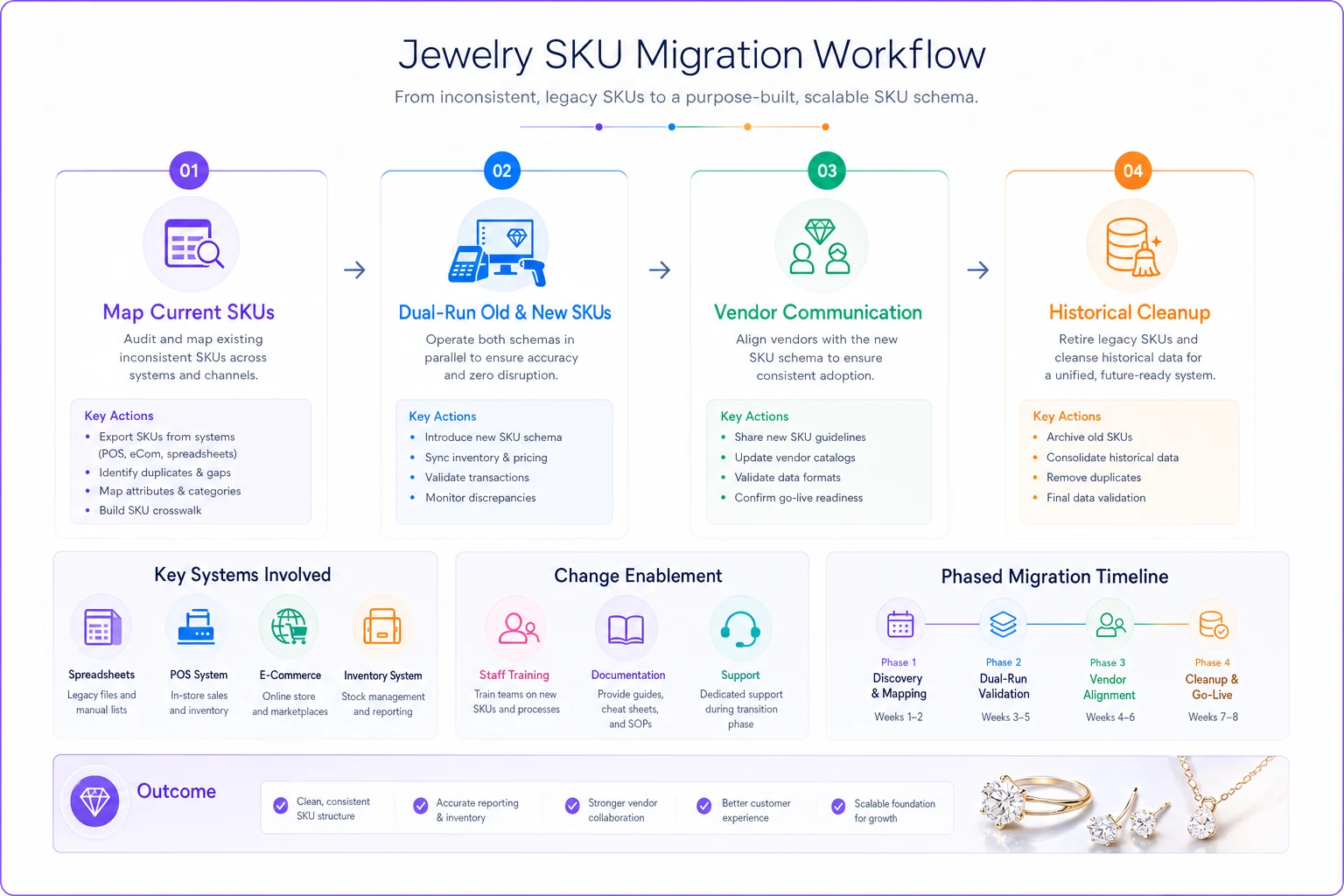
Phase 3: Vendor Communication (Week 4-6)
Send your SKU structure guide to key vendors: "We're standardizing our inventory system. Please include these attributes with all shipments: metal type, stone type, size, setting style. It helps us process orders faster and reorder accurately." Smart vendors will start providing this proactively — it reduces their own customer service burden.
Phase 4: Historical Cleanup (Week 8-20)
-
Current bestsellers
-
Items frequently reordered
-
Current case display items
-
Back stock high-value pieces
-
Slow movers
-
Discontinued items (optional)
Set a target of 50-100 items per week. A part-time staff member can handle this during slow periods.
Migration Checklist and Tracking
Pre-Migration Setup:
-
Export current inventory to master spreadsheet
-
Create SKU structure documentation
-
Set up alternate SKU field in POS
-
Train staff on new structure
-
Create vendor communication template
Weekly Migration Tasks:
-
Convert 50-100 existing SKUs
-
Apply new structure to all receiving
-
Update display tags for converted items
-
Test POS search functionality
-
Document any structure exceptions
Quality Checks:
-
Verify metal codes match actual items
-
Confirm sizes are accurate
-
Validate stone abbreviations
-
Test barcode scanning (if applicable)
-
Cross-check high-value items
Post-Migration Cleanup:
-
Archive old SKU list
-
Update vendor requirements
-
Revise staff training materials
-
Configure analytics reports
-
Document edge cases
Start with your top sellers to maximize early benefits and show quick wins to staff.
Post-Migration Cleanup:
SKU Mapping Tables for Common Scenarios
Not every item fits cleanly into the standard structure. Here's how to handle the common edge cases:
Multi-Stone Pieces
| Scenario | SKU Approach | Example |
|---|---|---|
| Diamond with sapphire accents | Use primary stone | 14W-DI-10-HAL-0234 |
| Three equal stones | Use dominant stone type | 14Y-EM-15-THR-0156 |
| No dominant stone | Use highest value stone | PLT-RU-20-MUL-0892 |
Variable Sizes
| Item Type | Size Position Usage | Example |
|---|---|---|
| Rings | Actual ring size | 14W-DI-10-SOL-0234 (size 10) |
| Bracelets | Length in inches | SLV-NO-07-CHA-0445 (7 inches) |
| Adjustable items | Use "AD" | 14Y-NO-AD-BAN-0123 |
Custom and Estate Pieces
| Category | Prefix Override | Example |
|---|---|---|
| Custom orders | CUS- prefix | CUS-14W-DI-15-HAL-0001 |
| Estate items | EST- prefix | EST-PLT-EM-08-SOL-0234 |
| Consignment | CON- prefix | CON-18Y-RU-10-PAV-0056 |
Not every item fits cleanly into the standard structure. Here's how to handle the common edge cases:
The Immediate POS Search Improvements
Once the new structure is live, POS searching works completely differently. Staff search logically instead of trying to remember random vendor codes:
-
Type "14W-DI" to see all 14k white gold diamond pieces
-
Search "HAL" to pull every halo setting across all metals
-
Filter by "07" to find all size 7 rings in stock
-
Query "-SA-" for all sapphire jewelry
The speed difference is real. Finding items drops from 2-3 minutes to under 20 seconds. Your newest staff member can search "14W-DI-10" when someone calls about white gold engagement rings around a carat and have relevant options immediately — no memorization, no asking someone more experienced.
Reorder Accuracy and Vendor Management
Structured SKUs change how reordering works. When a customer wants a matching band for their "14W-DI-10-HAL-0234" engagement ring, you immediately know the metal, the center stone size, and the setting style. You can reference item 0234 for exact specs.
Vendor reorders get more precise too. Instead of "please send more of item 7483," you request "14W-DI-10-HAL series" and the vendor knows exactly what you need. Fewer errors, fewer returns, fewer of those frustrating "that's not what we ordered" conversations.
Stores that implement structured SKUs often see reorder error rates drop considerably — from somewhere around 15% down to under 3% in some cases. That's fewer customer disappointments and less staff time managing returns.
Analytics and Inventory Insights
Structured SKUs unlock reporting that was previously impossible without manual work. Your POS can now actually answer:
Metal Performance:
-
Which metal type has the highest margin?
-
How does 14k vs 18k gold velocity compare?
-
What percentage of inventory is platinum?
Stone Preferences:
-
Which stone-metal combinations sell fastest?
-
Which colored stones sit the longest?
-
How does diamond size correlate with sale price?
Setting Trends:
-
Are halo settings growing in popularity?
-
Which settings have the highest return rates?
-
What's the average price point by setting style?
Monthly inventory analysis that used to take most of a workday can get done in under an hour. You spot trends faster, adjust buying earlier, and catch slow movers before they become aged inventory problems.
Managing the Transition Period
The biggest migration challenge isn't technical — it's getting staff to actually change habits. People comfortable with old systems resist switching, especially during busy stretches.
Create a translation guide showing old-to-new SKU mappings for your top 100 items. Post it at every POS station so staff can reference it quickly.
Run parallel systems for 60-90 days minimum. Don't force a hard cutover. Let staff naturally gravitate toward the new system as they see it working.
Celebrate early wins. When someone finds an item in 10 seconds, point it out. When reorder accuracy improves, share the numbers.
Handle edge cases fast. If certain items don't fit the structure cleanly, document the exception handling right away. Confusion that lingers turns into resistance.
Monitor search patterns to see if staff are actually using the new structure. Low adoption usually means something needs to be addressed — don't assume it'll sort itself out.
Integration with Modern Inventory Management
AI-powered inventory platforms can read structured SKUs to automate tasks that currently require manual attention:
Automatic reorder points based on metal-stone combination velocity. The system learns that 14W-DI pieces need higher stock levels than 14Y-EM items and adjusts accordingly.
Merchandising suggestions based on which SKU combinations sell well together. If 14R-MO pieces are moving, the platform surfaces that and suggests featuring them alongside rose gold diamonds.
Seasonal pattern recognition by SKU structure. Sterling silver upticks before the holidays, platinum peaks during engagement season — a well-configured system picks up on those rhythms without someone manually digging through sales data.
Automated vendor orders that monitor stock levels across SKU categories rather than item by item. Instead of someone checking each SKU individually, the system watches all "14W-DI" SKUs collectively and triggers reorders when group inventory drops below threshold.
That shift — from reactive to proactive — is where the real operational value shows up. You're not scrambling to reorder bestsellers after they're gone.
The 90-Day Implementation Timeline
Days 1-14: Foundation
-
Document new SKU structure
-
Create mapping spreadsheets
-
Configure POS alternate fields
-
Train key staff
Days 15-30: Pilot Testing
-
Convert top 200 items
-
Test search functionality
-
Refine structure based on feedback
-
Create exception handling rules
Days 31-60: Gradual Rollout
-
Convert 100 items weekly
-
Update all new receiving
-
Train remaining staff
-
Monitor adoption rates
Days 61-90: Full Implementation
-
Complete historical conversions
-
Discontinue old SKU searches
-
Generate first analytics reports
-
Optimize based on usage patterns
Most stores see positive ROI within 60 days through faster customer service and fewer errors. The full benefits — analytics, reordering, trend visibility — tend to materialize around the 90-day mark.
Measuring Success
Track these metrics to validate the implementation:
Speed Metrics:
-
Average time to find items (target
under 30 seconds)
-
POS searches per transaction (fewer means better first-search success)
-
Phone inquiry resolution time
Accuracy Metrics:
-
Reorder error rate (target
under 5%)
-
Inventory count discrepancies
-
Customer complaints about wrong items
Efficiency Metrics:
-
Monthly hours spent on inventory analysis
-
Time to generate sales reports by category
-
Staff training time for new employees
Revenue Metrics:
-
Reorder completion rate
-
Custom order accuracy
-
Lost sales from inability to locate items
Stores typically report meaningful improvements across the board within six months — faster searches, fewer reorder errors, and significantly less time spent on inventory analysis.
Conclusion
A purpose-built SKU strategy isn't just about organizing inventory. It's about eliminating the daily friction that costs you sales and frustrates staff. The metal-stone-size-setting structure creates a system that scales with your business and gets more useful over time, not less.
The migration feels like a big lift, but the phased approach makes it manageable. Start with your bestsellers, run parallel systems, and let the results speak for themselves. Once staff experience finding items in seconds instead of minutes, returning to the old way isn't appealing.
The longer-term value shows up in cleaner analytics, accurate reordering, and eventually a foundation for automated inventory management. You stop fighting your own system and start actually using it.
Most stores that go through this process say the same thing afterward — it's one of those improvements they wish they'd made years earlier. The longer you wait, the more chaotic data accumulates and the harder migration becomes. Starting with even your next shipment puts you on a path toward operational efficiency that compounds over time.
A purpose-built SKU strategy isn't just about organizing inventory. It's about eliminating the daily friction that costs you sales and frustrates staff. The metal-stone-size-setting structure creates a system that scales with your business and gets more useful over time, not less.
Ready to elevate your jewelry store operations?
Join 500+ jewelers using Jewlyly to increase efficiency, reduce errors, and grow revenue.