

Your customer calls their insurance company to add their new $12,000 engagement ring to their policy. Three days later, they're back at your store — frustrated, confused, and starting to question their decision. The underwriter rejected the appraisal because the certificate number doesn't match the invoice, the diamond grading report filename is corrupted, and your POS system shows a different carat weight than the paperwork. Now you're digging through folders on your computer, searching email attachments from your supplier, and trying to explain why everything is scattered across multiple systems. This happens more than jewelry store owners want to admit — and it's completely preventable with proper jewelry certificate management.
Why certificate chaos spreads through jewelry operations
Certificate and appraisal problems multiply because jewelry stores handle three distinct documentation streams that rarely talk to each other: grading reports from labs, internal appraisals from your bench jeweler or a third-party appraiser, and purchase documentation from suppliers. Each arrives in different formats, gets stored in different places, and follows whatever naming convention made sense to whoever saved it that day.
A typical store receives certificates as PDFs via email from GIA or AGS, paper documents from estate purchases that need scanning, appraisals created in-house using various software, and supplier certificates that might be photos, PDFs, or physical documents. Staff save these wherever makes sense in the moment — the desktop, a shared drive, attached to emails, or printed and dropped in a folder somewhere.
When a customer needs documentation for insurance, financing, or resale, you're searching across multiple locations. Staff waste 15-20 minutes per request hunting down the right files. Worse, when documents get misfiled or renamed inconsistently, you might hand over outdated versions or the wrong certificates entirely. The real damage shows up during insurance claims. A customer's ring gets stolen, they file a claim, the insurance company requests original documentation, and you can't find the GIA report because it was saved as "diamondcert2023.pdf" instead of including the certificate number. The claim gets delayed or underpaid, and your store's reputation takes the hit.
Building a certificate naming system that actually works
A functional naming convention needs to capture four things: the certificate type, the issuing authority, the unique identifier, and the date. Most jewelers miss one detail here — the naming system has to work for both humans browsing folders and search functions looking for specific documents.
Never miss a sale or shipment again.
Jewlyly helps you manage orders, track inventory, and engage customers seamlessly.
- Real-time inventory tracking
- Automated customer notifications
- Sales and order analytics
No credit card required
[TYPE][LAB][CERT#][DATE][CUSTOMER/STOCK#]
-
DIAMONDGIA233789123420240315INV4521
-
APPRAISALINTERNALAPP2024-089220240315SMITH
-
COLOREDAGLCS9874520240301STOCKEM127
The certificate type goes first — DIAMOND, COLORED, APPRAISAL, METAL — because it groups similar documents together when viewing folders alphabetically. Lab or source comes second: GIA, AGS, AGL, INTERNAL, SUPPLIER. Then the certificate number exactly as it appears on the document, followed by the date in YYYYMMDD format so files sort chronologically.
Keep the naming convention concise so part-time or seasonal staff can apply it without extra training.
The final element — either a customer name or stock number — creates the critical link to your POS system and customer records. This prevents the scenario where you have a certificate but can't figure out which sale it belongs to. Some stores try to get fancy with subcategories or lengthy descriptions. Keep it simple enough that part-time holiday staff can follow it without asking questions. Every additional element is another opportunity for someone to get it wrong.
Digital storage architecture that prevents certificate loss
Physical certificate storage seems straightforward until you're searching for a specific document on a busy Saturday afternoon. Digital storage eliminates that friction — but only if you structure it properly from day one.
/Certificates /01Diamonds /GIA /AGS /IGI /Other /02ColoredStones /AGL /GRS /SSEF /Other /03Appraisals /Internal /External /Insurance /04MetalAssays /05Archive /2023 /2024 /06Pending_Entry
The numbered prefixes force folders into a logical order regardless of alphabetical sorting. The Pending_Entry folder serves as a holding area for new certificates before they're properly named and filed — critical for maintaining system integrity when things get hectic.
Below is a visual workflow that shows how naming, filing, archiving, and backup interact in a reliable certificate storage process.
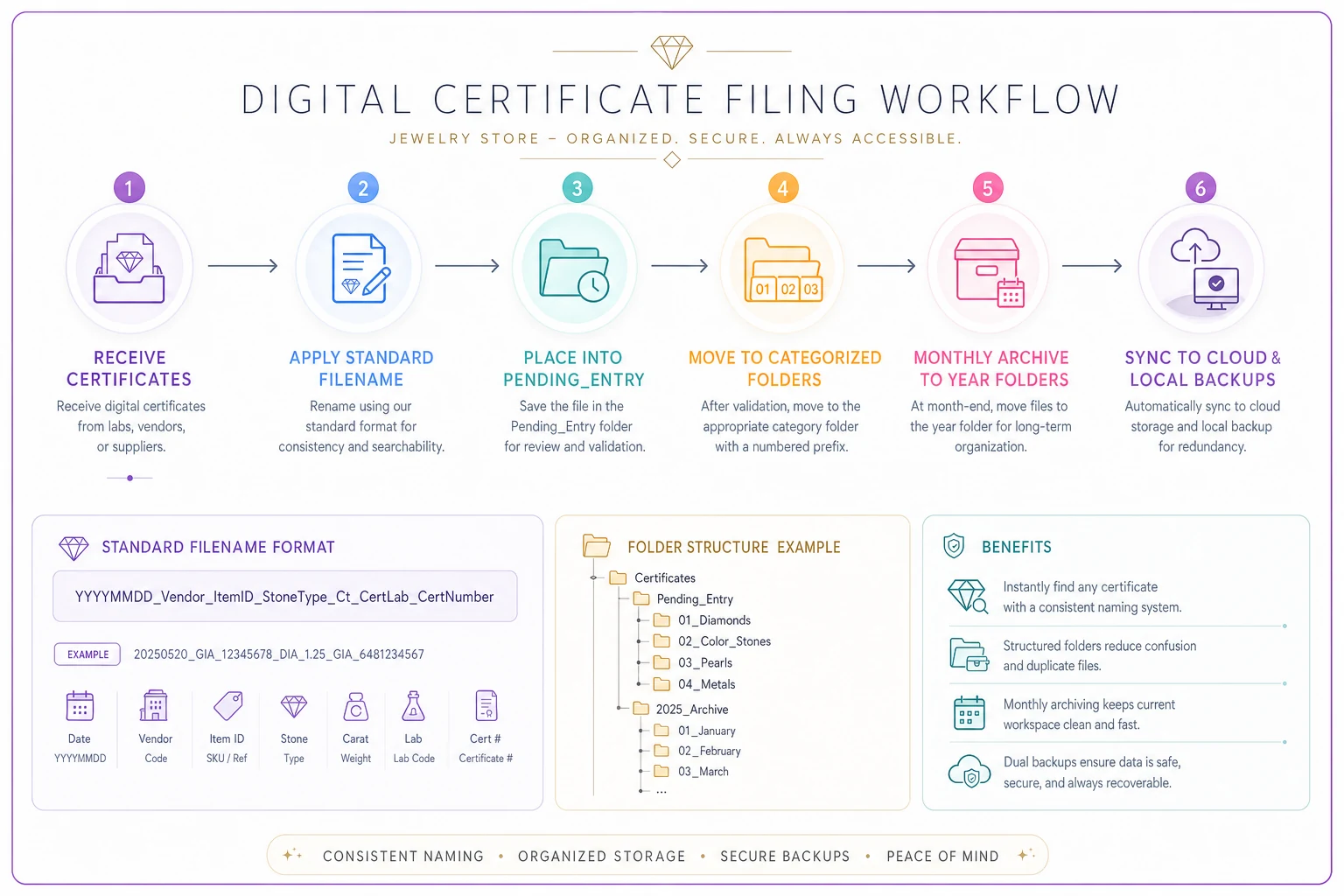
Within each folder, implement a monthly archive rule. Any certificate older than 12 months moves to the Archive folder, organized by year. This keeps your active folders manageable while preserving historical records for insurance claims or disputes that might surface years later.
Cloud storage through Google Drive or Dropbox handles backup and multi-location access, but you need local copies too. Internet outages happen, cloud services go down, and you can't make a customer wait while you troubleshoot a login issue. Sync your certificate folders to at least two local computers using the desktop app.
For stores handling more than 50 certificates monthly, certificate management features within operational software platforms are worth looking at. These systems can automatically organize documents, link them to inventory records, and generate consolidated reports for insurance companies without the manual assembly.
POS tagging strategies for insurance-ready items
Your POS system probably wasn't designed with insurance documentation in mind, but you can adapt it without waiting for perfect software. The key is using existing fields creatively and consistently.
Add certificate tracking to your item notes or custom fields:
| POS Field | Entry Format | Example |
|---|---|---|
| Notes/Comments | CERT:[Type][Number][Location] | CERT:GIA2337891234:DigitalFolder |
| Custom Field 1 | Certificate Number | 2337891234 |
| Custom Field 2 | Certificate Location | Digital/Physical/Pending |
| Custom Field 3 | Insurance Ready | Yes/No/Partial |
| Keywords/Tags | Certified, GIA, Appraised | GIA, Insured, AppraisalComplete |
The "Insurance Ready" field deserves attention. Mark items "Yes" only when all required documentation is properly filed and named. "Partial" means you're waiting on something — maybe the appraisal is complete but the lab certificate hasn't arrived yet. "No" means no documentation or incomplete files.
Train staff to check this field before quoting prices on certified pieces. Nothing frustrates customers more than paying a premium for certification, then discovering the paperwork isn't ready when they need it for insurance.
Set up a saved search or report in your POS for "Insurance Ready = Partial" and review it weekly. These are items where documentation gaps could cause real problems. Chase down missing certificates before the customer purchases, not after they're standing at your counter expecting a complete package.
Some jewelers resist putting certificate numbers directly in the POS, worried about security. But insurance companies increasingly require this level of documentation, and proper SKU structuring makes it possible to track certificates without exposing sensitive data to casual browsers.
Customer handoff scripts that set proper expectations
The moment of certificate handoff determines whether customers understand what they're receiving and how to use it for insurance. Most stores wing this conversation, which leads to confusion and callbacks later.
Complete Package Handoff: "Here's your complete insurance documentation package. You have the GIA diamond certificate showing all specifications, our detailed appraisal for insurance replacement value, and your purchase receipt. The insurance company will need all three documents. I'd recommend taking photos of these with your phone right now as a backup — and we're keeping digital copies here if you ever need replacements."
Partial Package with Follow-up: "Your GIA certificate and receipt are ready today. The insurance appraisal will be complete by Thursday — we'll call you when it's ready. Most insurance companies will start coverage with just the GIA report, but they'll want the appraisal within 30 days. Would you like us to email you digital copies of what we have so far?"
Estate or Uncertified Piece: "Since this is an estate piece without original certification, we've created a detailed appraisal that insurance companies accept. It includes multiple photos, measurements, and our certified appraiser's replacement value assessment. Some insurers might request an independent appraisal — if that happens, bring this documentation to the appraiser to speed up their process."
-
[ ] Verified all documents match item
-
[ ] Checked certificate numbers against POS
-
[ ] Offered digital copies
-
[ ] Explained insurance process
-
[ ] Noted any pending documents
-
[ ] Updated customer file
One mismatched certificate number can spiral into questions about authenticity, especially with high-value pieces. The checklist catches those errors before they leave the store.
The certificate log that saves your sanity
Every certificate that enters or leaves your store needs tracking in a simple, searchable log. Not the full documentation — just the critical facts that help you locate documents and resolve disputes months later.
| Date | Cert Type | Cert # | Lab | Item/SKU | Customer | Location | Staff | Notes |
|---|---|---|---|---|---|---|---|---|
| 3/15/24 | Diamond | 2337891234 | GIA | INV4521 | Pending | Digital+Physical | JS | Original from supplier |
| 3/16/24 | Appraisal | APP2024-089 | Internal | INV4521 | Pending | Digital | MK | $12,500 insurance value |
| 3/18/24 | Both | Multiple | — | INV4521 | J. Smith | Given to customer | JS | Emailed copies |
Keep this in a spreadsheet on your shared drive where all staff can access it. The value is searchability — when Mrs. Smith calls six months later saying her insurance company lost the documentation, you search her name and immediately see what was provided and when.
The log also surfaces operational patterns. If certain staff consistently forget to log certificates, you know where training is needed. If specific certificate types keep going missing, you adjust your storage system. When suppliers send certificates late, you have documentation for vendor performance conversations.
Don't overcomplicate it with excessive fields. The temptation is to track everything — photo requirements, insurance company names, claim numbers. Resist this. A complex log doesn't get filled out, especially during holiday rushes. Basic information consistently logged beats comprehensive data sporadically recorded. Update in real-time, not at day's end. Memory fades fast in retail.
Insurance company requirements you can't ignore
Insurance underwriters have specific requirements that vary by company and coverage level. Understanding these patterns helps you prepare documentation packages that get approved on first submission.
Primary Documentation:
-
Independent lab certificate (for diamonds over 0.50ct)
-
Detailed appraisal less than 2 years old
-
Clear photos showing the item from multiple angles
-
Purchase receipt showing price paid
The appraisal must include the appraiser's credentials, a full description using industry-standard terminology, current replacement value (not purchase price), and a dated signature. Handwritten appraisals get rejected more often than typed ones. Insurance companies particularly scrutinize appraisals that seem inflated — replacement values more than 40% above purchase price tend to trigger additional review.
For estate pieces or items without certificates, insurers typically accept detailed appraisals from certified appraisers, but they might limit coverage or request additional documentation. Some companies want second opinions on items over $25,000 without lab certificates.
-
Cover sheet with item summary
-
Certificate copies
-
Appraisal
-
Photos
-
Receipt
-
Care instructions
Bind these into a clear folder or create a single PDF. This reduces customer confusion and cuts down on insurance rejections significantly. Having a consistent process for this — and checking it before the customer leaves — removes most of the callbacks and miscommunication that tends to pile up over time.
When certificate management systems make sense
Stores handling fewer than 20 certificates monthly can manage with careful folder organization and a spreadsheet. But operational complexity grows fast. You're suddenly tracking certificates for inventory, customer purchases, repairs, consignments, and custom orders all at once.
Software becomes worth considering when you're spending more than two hours weekly on certificate management tasks — filing, searching, preparing insurance packages, handling documentation requests. Modern jewelry operations platforms can automatically organize certificates as they arrive, link them to inventory items, and generate insurance-ready packages without the manual assembly.
The practical efficiency gain is search. Instead of clicking through folders, you search a certificate number and immediately access the full documentation, the related sale, and customer details. When an insurance company calls about a claim from three years ago, you pull the complete history in seconds rather than spending an afternoon on it.
AI-assisted features in some of these platforms can read certificate data automatically and flag discrepancies between documentation and POS entries before they cause problems — which is genuinely useful when you're processing high volumes of certified inventory. They also maintain audit trails showing who accessed which certificates and when, which matters for high-value inventory control.
That said, don't add software just because it exists. If your current system works and staff follow it consistently, adding technology might create more complexity than it solves. The real trigger for most stores is when certificate errors start affecting customer satisfaction or staff are regularly burning time searching for documentation.
Scaling certificate operations as you grow
Certificate management requirements shift significantly as stores expand. What works for a hundred certificates annually starts breaking down around five hundred. The folder system that felt organized with one location becomes a mess across multiple stores.
Growing stores need role-based access controls. Not every staff member should have access to all certificates. High-value diamond certificates might be restricted to managers, while appraisals stay accessible to all sales staff. This reduces both security risks and accidental modifications.
-
How long to retain certificates for sold items
-
When to destroy certificates for returned merchandise
-
Archive procedures for estate purchases
-
Retention requirements related to insurance claims
Multi-location operations face their own challenges. Each store needs access to certificates for transferred inventory, but keeping synchronized copies across locations creates version control problems. Cloud-based systems solve this, but require reliable internet and solid backup procedures for when connections fail.
Consider certificate lifecycle management as volume grows. Larger operations benefit from quarterly certificate audits. Randomly sample 10-15 items from inventory and verify all documentation matches the physical items and POS records. These spot-checks catch systemic problems before they reach customers, and they're a good habit to build before you actually need them.
Poor certificate management feels like a minor back-office issue until it costs you a customer or damages your standing with insurance companies. The stores that hold up long-term treat documentation as seriously as they treat physical inventory.
Start with a simple naming convention and folder structure. Make it easy enough that seasonal staff can follow it without extensive training. Build certificate tracking into your existing POS workflow rather than creating separate systems that get skipped when things get busy. Develop clear handoff scripts so customers understand what documentation they're receiving and why it matters for coverage.
The investment in proper certificate management — whether through disciplined manual processes or operational software — pays off in fewer customer complaints, faster insurance approvals, and real time savings for staff. More importantly, it builds trust. When customers know you can pull any documentation they need without hesitation, they're more comfortable making larger purchases and sending people your way. Every certificate that enters your store represents a promise about authenticity and value. How you manage that documentation determines whether you can actually keep that promise when it matters.
Ready to elevate your jewelry store operations?
Join 500+ jewelers using Jewlyly to increase efficiency, reduce errors, and grow revenue.