


Most jewelry stores don't have a forecasting problem. They have a reaction problem. Someone notices the tennis bracelet case looking thin, texts the vendor, and hopes the reorder arrives before the next engagement rush. Meanwhile there's a drawer of anniversary bands that hasn't moved since two Christmases ago, quietly tying up cash that could've gone toward stock that actually sells.
The gap between those two situations — reacting late on fast movers and overbuying the slow ones — is where jewelry demand forecasting earns its keep. And it's not about fancy math. It's about building a repeatable loop that reads your own history correctly, respects how differently your categories behave, and gives you a reorder number you can trust without staring at spreadsheets every Monday.
The catch is that jewelry breaks most off-the-shelf forecasting advice. Generic retail forecasting assumes you're moving hundreds of units a month with messy-but-consistent demand. A lot of your SKUs sell 3 or 4 units a year. That difference changes everything about how you should model it.
Why one forecast for the whole store quietly loses you money
The core mistake is treating the store as one demand pattern. Bridal and fashion live on completely different clocks, and when you blend them, the forecast smooths out exactly the signals you need.
Bridal demand is lumpy and event-driven. Engagement season — roughly late November through Valentine's Day — drives a concentrated spike, then a second, softer wave feeds into spring weddings. A single custom halo setting might sell 6 units all year, four of them in a 10-week window. Fashion — stackable rings, hoops, gift-price pendants — behaves more like normal retail. Steadier baseline demand, a Q4 bump, and enough velocity that averages actually mean something.
Forecast both together and the bridal spike inflates your fashion baseline while the fashion steadiness masks how concentrated bridal really is. You end up carrying bridal inventory in July you didn't need, and running short on gift-price fashion in December. What tends to happen across smaller shops is that this blended approach feels fine on the P&L until you look at aged inventory — and then you find 30–40% of your carrying cost sitting in categories that only turn once or twice a year.
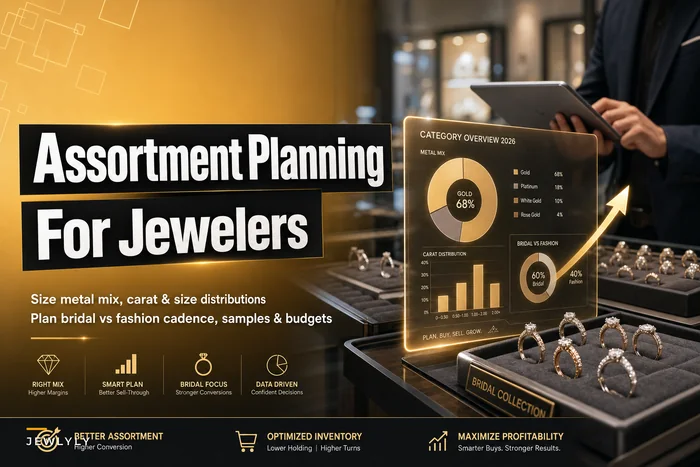
This is why category-level structure has to come before any forecasting. If you haven't already sized how much of your buy should sit in each metal and category, that work comes first — the category-level assortment planning approach for sizing your metal mix and bridal cadence is the foundation the forecasting sits on top of. Assortment planning tells you what the mix should be. Forecasting tells you when and how much to reorder.
Category-specific forecasting templates: bridal vs fashion
The practical fix is running two different template logics, not one. Here's how they actually differ in setup.
Never miss a sale or shipment again.
Jewlyly helps you manage orders, track inventory, and engage customers seamlessly.
- Real-time inventory tracking
- Automated customer notifications
- Sales and order analytics
No credit card required
| Factor | Bridal template | Fashion template |
|---|---|---|
| Demand shape | Spiky, event-driven | Steadier with seasonal lift |
| Sales history needed | 2–3 years (to see the pattern repeat) | 12–18 months usually enough |
| Forecast unit | Setting styles + center-stone specs | SKU or style-color |
| Lead time sensitivity | High (custom, sizing, sourcing) | Moderate |
| Safety stock logic | Cover the peak window, not the year | Cover normal variability |
| Reorder trigger | Calendar + threshold | Threshold-based |
For bridal, you're not really forecasting monthly units — you're forecasting the season. Take the last two or three years of a setting style, isolate the engagement window, and ask: how many sold in that 10–12 week stretch, and how early do you need coverage given a 5–8 week sourcing lead time? The forecast becomes "peak-window demand minus what's already on hand and on order, placed early enough to land before the wave hits."
For fashion, a rolling baseline works. Take a trailing 6-month average of weekly sales, layer in a seasonal factor for the SKU, and set a reorder point. Fashion tolerates automation much better because the demand is frequent enough that the math actually stabilizes.
The mistake is forcing bridal into a threshold-only reorder system. Bridal needs a calendar trigger — "order the spring bridal wave by early January regardless of current stock" — because waiting for the shelf to hit a reorder point means your lead time already put you behind the season.
Seasonal decomposition without overthinking it
Seasonal decomposition sounds academic, but the useful version is pretty simple: separate each SKU's sales into three pieces — the baseline level, the seasonal pattern, and the random noise. You want to know how much of a December spike is predictable versus a one-off that you shouldn't build inventory around.
Here's a worked example with a gift-price pendant.
Say last year's monthly units looked like this:
-
Jan–Oct
mostly 8–12 units/month
-
Nov
22 units
-
Dec
41 units
The naive read is "December sells 41, buy for 41." The decomposed read is different. Your baseline is roughly 10/month. December ran about 4x baseline. But if 12 of those 41 units came from a single walk-in buying corporate gifts, your repeatable December seasonal factor is closer to 3x, not 4x. Building for 41 next year overshoots by around a dozen units of tied-up cash.
A rough seasonal index you can actually compute by hand:
-
Sum the year's units and divide by 12 to get an average month.
-
Divide each month's actual units by that average — that's the seasonal index for the month.
-
Strip out obvious one-offs before computing, or they'll distort the whole index.
-
Apply those indexes to next year's expected baseline.
You don't need software to do this for your top 30 SKUs. You do need it once you're tracking hundreds of SKUs across multiple categories, because the decomposition has to run per-SKU and refresh as new sales come in. That's where the manual version quietly stops happening — it works for a quarter, then someone gets busy, and the whole thing rots.
Safety-stock math tuned for small SKU counts
Standard safety-stock formulas assume enough volume that demand looks like a smooth bell curve. Most jewelry SKUs break that assumption. When you sell 4 units a year, the textbook formula produces numbers that are either meaningless or dangerously low.
A few practical adjustments by tier:
-
Slow movers (under ~12 units/year) skip the statistical formula. Use a min/max rule instead — something like "keep 1 on hand, reorder 1 when it sells" for display continuity, or hold zero and go made-to-order if lead time allows.
-
Mid movers use a simplified safety stock based on lead-time demand variability, but cap it. If lead time is 4 weeks and you're selling around 2/week with occasional spikes to 4, cover the realistic bad-week scenario — not a theoretical 99% service level that forces you to overstock.
-
Fast movers (fashion basics, stud earrings, popular chains) standard math actually works here. Safety stock = coverage for lead-time variability at whatever service level you choose.
> Reorder point = (average weekly demand × lead time in weeks) + safety stock
Take a popular gold chain: sells about 6/week, lead time is 3 weeks, and you want a small buffer — say 5 units of safety stock.
Reorder point = (6 × 3) + 5 = 23 units. When stock hits 23, you reorder. Order quantity depends on vendor minimums and how much cash you want tied up, but the trigger is clear and doesn't require a judgment call each time.
The part most owners skip: your SKU count needs to be segmented into these tiers before you set any rules. Applying one safety-stock logic across a slow bridal setting and a fast stud earring is exactly how you end up simultaneously overstocked and out of stock.
Translating forecasts into actual reorders
A forecast that lives in a spreadsheet nobody opens is worthless. The value is in the forecast becoming a reorder action with as little manual judgment as possible. Here's the loop that actually holds up in practice:
-
Clean the sales history. Strip one-off bulk sales, tag returns correctly, and make sure custom orders aren't polluting your stock-item demand.
-
Segment SKUs into tiers (slow / mid / fast) and by category (bridal / fashion).
-
Compute the seasonal index per SKU or per style group.
-
Set the reorder rule per tier calendar-trigger for bridal waves, reorder-point for fashion and fast movers, min/max for slow movers.
-
Generate a reorder list on a fixed cadence — weekly for fast movers, monthly for the rest.
-
Review exceptions, not everything. The system surfaces SKUs that hit their trigger or drifted from forecast. You spend attention there, not on the full list.
-
Feed actuals back in so next season's forecast improves.
The step that breaks in practice is #6. When every reorder needs a human to eyeball every SKU, the whole system collapses the moment the store gets busy. Exception-based review is the only version that survives: the reorder list is pre-built from your rules, and you override the handful that look off.
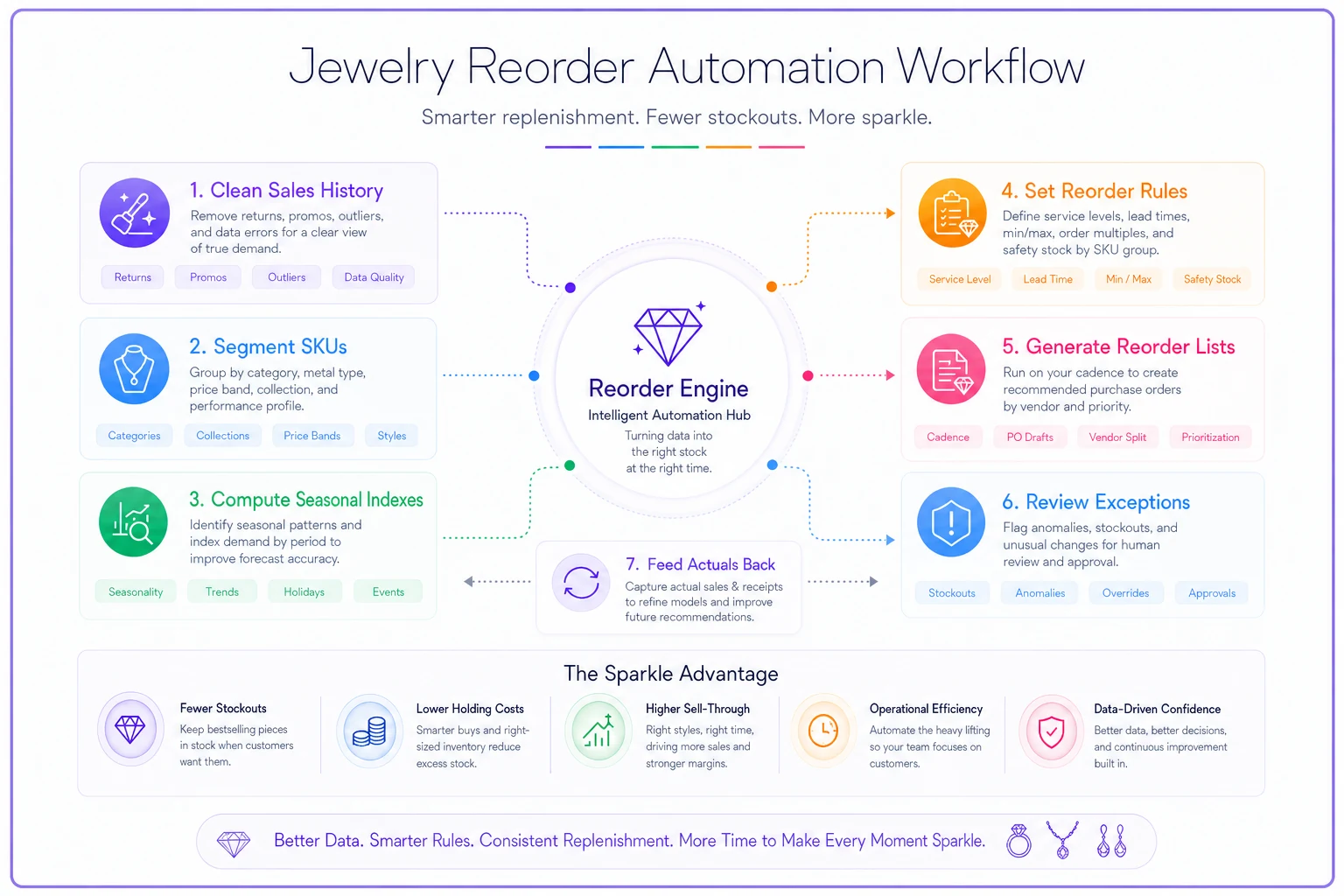
The diagram shows the loop in a single flow so you can see where automation reduces manual steps and where human judgment still matters.
Automate exception alerts so you only review the handful of SKUs that actually need judgment.
Your product data structure also determines whether any of this is even viable. If two of the same chain are entered as different SKUs, or the same style is spelled three ways, your forecast is garbage before it starts. A purpose-built SKU schema that supports faster reorders and accurate POS search isn't a side project — it's the thing that makes forecasting reliable in the first place. Clean SKUs in, trustworthy reorder points out.
Where AI-assisted forecasting genuinely helps (and where it doesn't)
Worth being honest here. For your top 20–30 SKUs, you can do all of this by hand, and plenty of solid shops do. The seasonal index, the reorder point — it's arithmetic.
Where it falls apart is scale and consistency. Once you're running category-split forecasts across hundreds of SKUs, refreshing seasonal indexes as new sales land, and re-tiering items whose velocity shifted, the manual version stops happening. Not because it's hard — because it's tedious, and it competes with everything else involved in running the store.
That's the practical role for AI-assisted operational software. It handles the parts that humans quietly skip: recomputing decomposition per SKU every time data updates, flagging when a SKU's real demand has drifted from its forecast, pushing pre-built reorder lists into your POS or purchase-order workflow, and catching bridal calendar triggers before the season sneaks up on you. The owner still makes the buying calls. The software just keeps the numbers current and makes sure exceptions get surfaced instead of buried.
The line to hold: automation is for the repetition, not the judgment. It shouldn't auto-place orders on high-value or custom-adjacent items without a human in the loop. But it absolutely should stop you from discovering you're out of a fast-moving chain because nobody ran the report that week.
When this makes sense — and when it doesn't
When forecasting this way pays off:
-
You carry more than roughly 150–200 active SKUs and can't hold them all in your head.
-
You've had both dead stock and stockouts in the same quarter.
-
Bridal and fashion are both meaningful parts of your business.
-
You have at least a year of decent POS history to work from.
When it's overkill:
-
Tiny shop, tight curated assortment, everything visible at a glance. A good min/max list might serve you fine.
-
Almost entirely custom or made-to-order — you're forecasting capacity, not stock, which is a different problem.
-
Your POS data is a mess. Fix the data first. Forecasting on bad data just automates bad decisions faster.
Who should not do this yet: anyone whose SKU records aren't clean. Duplicate SKUs, inconsistent naming, and untagged returns will produce confident-looking forecasts that are wrong. That cleanup is unglamorous, but it's the prerequisite.
A quick real scenario
A single-location store doing a mix of bridal and fashion, roughly $1.4M in annual revenue, was reordering purely on gut. Their aged inventory — nothing sold in 12+ months — had crept to somewhere around $110k tied up. A big chunk of it was bridal settings bought reactively during past busy seasons, plus fashion pieces overbought on a vendor deal.
They split forecasting into the two templates, tiered their SKUs, and set calendar triggers for bridal waves with reorder points for fast-moving fashion. Nothing dramatic happened immediately. Over about two seasons, the aged-inventory pile came down to somewhere in the $60k–$70k range because they stopped overbuying slow bridal, and fashion stockouts during Q4 dropped noticeably — the easy gift-price sales they used to run out of started sticking.
The owner's own summary was the useful part: the work wasn't the math, it was finally trusting a reorder number enough to stop second-guessing it every week.
The takeaway
Jewelry demand forecasting works when you stop treating the store as one demand curve and start respecting how differently bridal and fashion actually behave. Split the templates, decompose the seasonality honestly, tune your safety stock to how few units you genuinely sell, and turn the whole thing into reorder triggers you can trust. Do that, and reordering stops being a weekly fire drill and starts running quietly in the background — protecting both your cash and your shelves.
Start with your top SKUs by hand to build the intuition. Then, as the SKU count grows past what you can track in your head, lean on software to keep the numbers current — so the right decisions keep happening even during the weeks you're too busy to run a single report.
Ready to elevate your jewelry store operations?
Join 500+ jewelers using Jewlyly to increase efficiency, reduce errors, and grow revenue.