



Most jewelry stores run their POS systems fine day-to-day. Sales get rung up, deposits get collected, repairs move through the bench. But then month-end hits and suddenly you're staring at a mess of transaction flags that don't map cleanly to your accounting software.
The real problem isn't that your POS is broken or your bookkeeper doesn't understand jewelry. It's that jewelry stores handle money differently than regular retail. A single customer might have a layaway balance, a repair deposit, and consigned pieces all at once. Your POS tracks these with flags and codes, but your accounting software wants clean journal entries.
The pattern I've seen across jewelry stores is pretty consistent. The ones that close their books in 2-3 days have clear reconciliation templates. The ones taking two weeks are manually sorting through transactions, guessing at what goes where.
Why jewelry reconciliation breaks differently
Layaway payments that sit as liabilities for months before converting to revenue. Your POS shows them as partial payments, but they need to post as customer deposits in accounting until the final payment clears.
Repair deposits that might become revenue immediately (for simple sizings) or stay as liabilities for weeks (for custom work). The same $200 deposit could be advance payment or a liability depending on completion status.
Consignment settlements where you're collecting money that's partially yours and partially the consigner's. The POS sees a sale, but accounting needs to split it between revenue and payables.
Custom order deposits that move through multiple stages. Initial deposit, material payment, final balance — each needs different accounting treatment depending on where you are in the process.
Trade-in credits that reduce cash collected but still count as full revenue. Your deposit won't match your sales total, and that's actually correct.
Standard accounting software expects simple transactions. Jewelry stores create complex ones. Without clear mapping rules, each transaction becomes a judgment call.
Building transaction mapping templates
The most effective jewelry stores treat their POS flags like a foreign language that needs translating. Every flag combination gets a specific accounting outcome. No guessing, no interpretation.
Never miss a sale or shipment again.
Jewlyly helps you manage orders, track inventory, and engage customers seamlessly.
- Real-time inventory tracking
- Automated customer notifications
- Sales and order analytics
No credit card required
Start with your most common transaction types and build out from there.
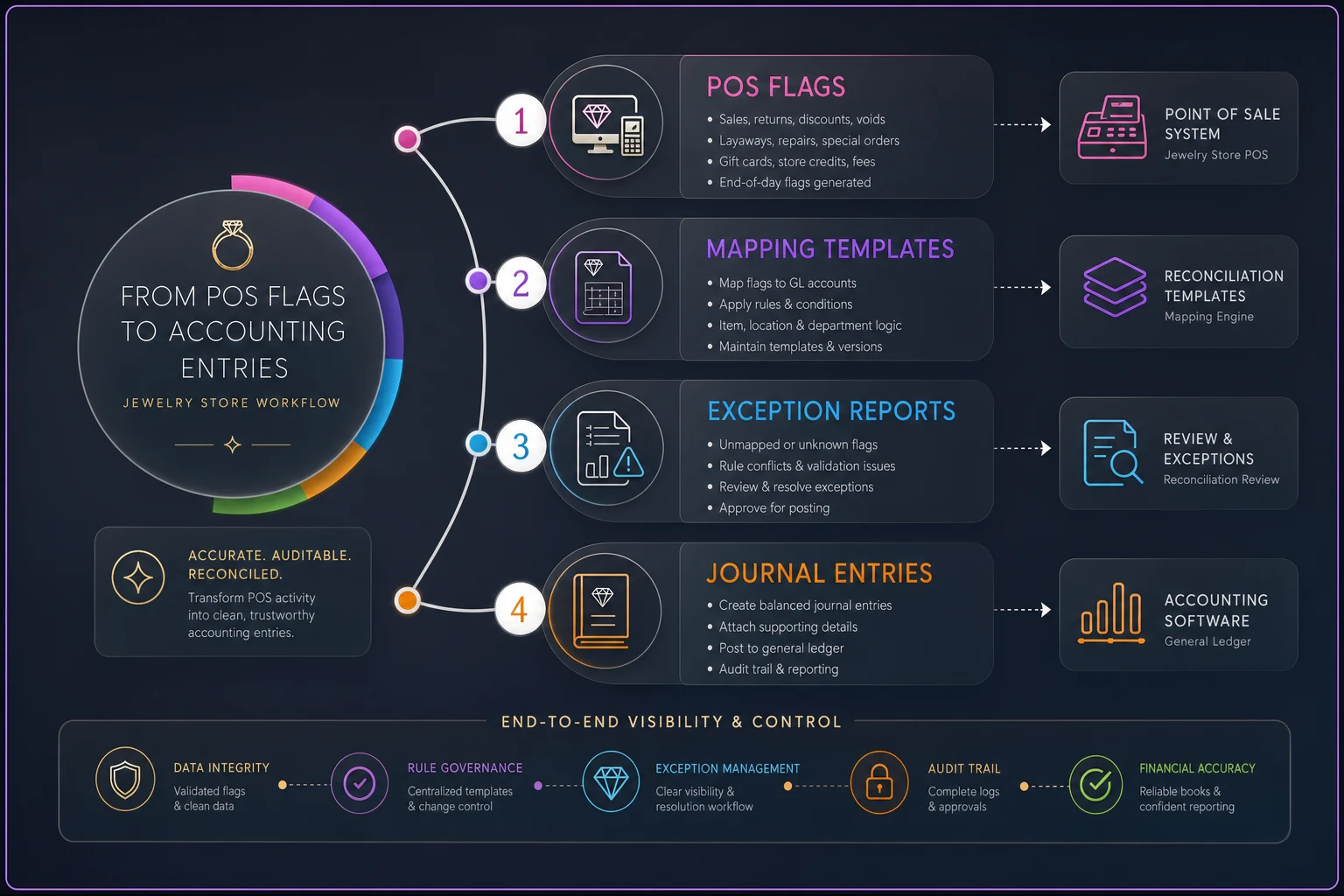
This diagram shows how POS flags flow into mapping templates and accounting entries.
Basic sales mapping
| POS Flag | Transaction Type | Debit | Credit | Notes |
|---|---|---|---|---|
| SALE | Regular sale | Cash/Bank | Sales Revenue | Standard retail transaction |
| SALE + TRADEIN | Sale with trade | Cash + Inventory | Sales Revenue | Split the debit side |
| SALE + DISCOUNT | Discounted sale | Cash + Discount Expense | Sales Revenue | Track discount patterns |
This seems obvious, but many stores don't have it documented. When someone new handles month-end, they're making assumptions.
Deposit and liability mapping
| POS Flag | Transaction Type | Debit | Credit | When to recognize revenue |
|---|---|---|---|---|
| LAYAWAY_DEPOSIT | Initial layaway payment | Cash | Customer Deposits (Liability) | At final payment |
| LAYAWAY_PAYMENT | Ongoing payment | Cash | Customer Deposits (Liability) | At final payment |
| LAYAWAY_FINAL | Final payment | Cash + Customer Deposits | Sales Revenue | Immediately |
| REPAIR_DEPOSIT | Repair prepayment | Cash | Repair Deposits (Liability) | At pickup |
| CUSTOM_DEPOSIT | Custom order down payment | Cash | Customer Deposits (Liability) | At completion |
Notice how similar transactions need different treatment. A repair deposit becomes revenue when the customer picks up. A custom deposit might sit for months.
Consignment complexities
| POS Flag | Transaction Type | Debit | Credit | Additional entries |
|---|---|---|---|---|
| CONSIGN_SALE | Consignment sold | Cash | Commission Revenue + Consigner Payable | Track by consigner |
| CONSIGN_RETURN | Unsold return | Memo only | Memo only | Update consignment log |
| CONSIGN_PAYOUT | Paying consigner | Consigner Payable | Cash | Match to sales |
One store had over $47,000 in consigner payables they couldn't reconcile because nobody was tracking which payments matched which sales. Simple flag mapping would have prevented the whole thing.
Exception reporting that actually catches problems
Templates handle normal transactions. Exception reports catch the weird stuff that slips through.
The most useful exception reports for jewelry month-end reconciliation:
-
Orphaned deposits report Any deposit flag without a corresponding completion flag within 90 days. These are usually forgotten repairs or abandoned layaways that need write-off decisions.
-
Unmatched consignment report Consignment sales without matching intake records. Sometimes staff sell consigned pieces without proper intake, creating phantom payables.
-
Split payment audit Transactions with multiple payment types that don't sum correctly. Common when mixing cash, credit, and trade-ins on high-value sales.
-
Flag combination warnings Unusual flag combinations that suggest data entry errors — LAYAWAYFINAL without prior LAYAWAYDEPOSIT flags, for instance.
Run these before starting reconciliation. Fix the obvious errors first, then reconcile the clean transactions.
A worked month-end example
Here's how the templates and exception reports work together in practice — an actual October close for a store doing around $180,000 in monthly sales.
Day 1: Pull reports and run exceptions
October sales report shows:
-
247 regular sales
-
31 layaway payments
-
18 repair completions
-
7 consignment sales
-
14 custom deposits
Exception report flags:
-
3 orphaned repair deposits from August
-
1 consignment sale missing intake paperwork
-
2 layaway finals without deposit history
Day 2: Clean up exceptions
Called customers about orphaned repairs. Two picked up immediately (converted to revenue), one abandoned (wrote off a $75 deposit).
Traced the consignment sale to an intake from a different location. Updated records to match.
Investigated the layaway finals — both were data entry errors where staff used the wrong flag. Corrected to regular sales.
Day 3: Process standard transactions
With exceptions cleared, applied mapping templates: Regular sales: $156,000 → Sales Revenue Layaway payments: $8,400 → Customer Deposits (Liability) Layaway completions: $11,200 → Sales Revenue + clearing deposits Repair completions: $3,200 → Sales Revenue Consignment sales: $9,000 → $2,700 Commission Revenue + $6,300 Payables Total deposits to match: $189,300 (including trade-in adjustments)
Day 4: Final reconciliation
Bank deposits: $189,300 POS deposits: $189,300 Variance: $0
The clean match only happened because every transaction type was mapped correctly beforehand. Previous months took 8-10 days with constant back-and-forth between the bookkeeper and store manager.
Handling complex month-end scenarios
Partial custom completions Customer picks up a custom piece but hasn't paid in full. The work is done, so you can recognize revenue, but there's still an outstanding balance. Create two entries: one clearing the deposit liability to revenue, another creating an accounts receivable for the remainder.
Voided transactions after deposit The sale was included in yesterday's deposit but got voided today. Your bank deposit won't match today's sales. Track these separately and adjust in the following day's reconciliation.
Cross-month layaway completions Layaway started in June, final payment in October, customer doesn't pick up until November. Revenue recognition depends on your policy — at payment or at pickup. Pick one and stick with it consistently.
Consignment sales with repairs Sold a consigned piece that needed sizing. The sale amount includes the repair charge, but the consigner only gets their percentage of the original price. Split the transaction: consignment sale and repair service, treated separately.
Building sustainable reconciliation workflows
The best reconciliation system is one your team actually uses. The stores that make these processes stick share a few characteristics.
They batch similar transactions. Instead of jumping between layaways, repairs, and consignments, they process all layaways, then all repairs, then all consignments. Fewer mental switches means fewer errors.
Batch similar transactions to minimize mental switching: process all layaways, then all repairs, then all consignments.
They reconcile daily, not monthly. A quick 15-minute daily check catches problems immediately. Month-end becomes a summary, not an archaeological dig.
They document edge cases. When something weird happens, they write down how they handled it. Next time it comes up, there's a precedent.
They rotate responsibilities carefully. The person entering transactions shouldn't be the only one who reconciles. Fresh eyes catch patterns the daily operator misses.
When POS limitations force manual processes
Sometimes your POS just can't track what you need. Some stores are running systems from the early 2000s that barely handle basic sales, let alone complex jewelry transactions.
Deposit log spreadsheet Track every deposit manually with date, customer, amount, type, and expected completion. Match against POS data during reconciliation.
Consignment database Maintain separate consignment records with photos, intake dates, terms, and settlement history. The POS might show the sale, but your database shows the full story.
Repair status board Physical or digital board showing every repair's status. When the POS says a deposit exists but you can't find the repair, the board tells you what actually happened.
These parallel systems create extra work, but they're better than losing track of customer money. A few stores I've worked with used manual tracking as a bridge while upgrading to AI-powered operational software that handles complex jewelry workflows natively — which eliminates most of this overhead once it's set up properly.
Red flags that your reconciliation is broken
If any of these sound familiar, your process needs work:
-
Your monthly close takes more than 5 business days. With proper templates, even complex months should wrap up within a week.
-
Different people get different answers. If two people reconciling the same month land on different numbers, your rules aren't clear enough.
-
You're constantly writing off small variances. Those $20-50 differences aren't rounding errors — they're symptoms of systematic problems.
-
Customer complaints about deposits spike after month-end. This usually means you're writing off deposits that customers think are still active.
-
Your auditor or tax preparer asks a lot of questions. Clean reconciliation should be self-explanatory. Too many questions mean unclear categorization.
Clean reconciliation should be self-explanatory. Too many questions mean unclear categorization.
Technology and reconciliation efficiency
Modern operational platforms can eliminate most manual reconciliation work. AI automation can match transactions, flag exceptions, and suggest corrections based on historical patterns.
But even without advanced software, basic improvements help. Export your POS data to spreadsheets where you can sort, filter, and subtotal. Use formulas to flag transactions that break your rules. Set up automated bank feeds so you're matching against real deposits, not manual entries.
The goal is making the repetitive work systematic so humans can focus on judgment calls. Matching 200 normal sales shouldn't take meaningful human time. Figuring out why a consignment payout doesn't reconcile should.
Moving beyond monthly fire drills
Good jewelry month-end reconciliation eventually gets boring. Transactions flow into the right accounts. Exceptions get caught early. Month-end becomes a verification, not a reconstruction.
That only happens when you treat reconciliation as an operational process, not an accounting afterthought. Your POS flags need to tell a clear story. Your mapping rules need to cover every real scenario your store runs into. Your exception reports need to catch problems before they compound.
Start with your highest-volume transaction types. Build templates that handle the bulk of your transactions cleanly. Add exception reports to catch obvious errors. Document edge cases as you encounter them — not in your head, written down somewhere your team can find.
And treat reconciliation mistakes as process failures, not people failures. When something reconciles wrong, fix the process so it can't happen the same way again.
Clean books aren't just about satisfying your accountant. They're about knowing exactly where your money is, which customers owe you, and which consigners you owe. That clarity drives better decisions and fewer surprises.
Your reconciliation will never be perfect — there's always some weird transaction that breaks the rules. But with clear templates, smart exception reporting, and consistent habits, month-end stops being a dreaded marathon and becomes something close to routine.
Good jewelry month-end reconciliation eventually gets boring. Transactions flow into the right accounts. Exceptions get caught early. Month-end becomes a verification, not a reconstruction.
That only happens when you treat reconciliation as an operational process, not an accounting afterthought. Your POS flags need to tell a clear story. Your mapping rules need to cover every real scenario your store runs into. Your exception reports need to catch problems before they compound.
Start with your highest-volume transaction types. Build templates that handle the bulk of your transactions cleanly. Add exception reports to catch obvious errors. Document edge cases as you encounter them — not in your head, written down somewhere your team can find.
And treat reconciliation mistakes as process failures, not people failures. When something reconciles wrong, fix the process so it can't happen the same way again.
Clean books aren't just about satisfying your accountant. They're about knowing exactly where your money is, which customers owe you, and which consigners you owe. That clarity drives better decisions and fewer surprises.
Your reconciliation will never be perfect — there's always some weird transaction that breaks the rules. But with clear templates, smart exception reporting, and consistent habits, month-end stops being a dreaded marathon and becomes something close to routine.
Ready to elevate your jewelry store operations?
Join 500+ jewelers using Jewlyly to increase efficiency, reduce errors, and grow revenue.